About the Palo Alto Networks WildFire Integration
Palo Alto Networks® WildFire,® together with the IOC Scanner Plugin, integrates eyeSight with Palo Alto Networks WildFire. This integration combines the threat detection mechanisms of Palo Alto Networks WildFire with the network visibility and compliance enforcement capabilities of eyeSight to multiply the benefits of working with an Advanced Threat Detection product.
Palo Alto Networks WildFire enables eyeSight and Palo Alto Networks WildFire to work together to quickly find indicators of compromise (IOCs), detect advanced threats, contain infected endpoints, and disrupt the cyber kill chain, thus preventing further lateral threat propagation and data exfiltration. This helps the security team prevent, detect, analyze, and respond to advanced attacks.
Advanced Threat Detection with the IOC Scanner Plugin
Palo Alto Networks WildFire works with the IOC Scanner Plugin, eyeSight action center for Advanced Threat Detection (ATD) and response. The IOC Scanner Plugin provides:
- A centralized repository of all threats and their IOCs (indicators of compromise) reported by third-party ATD solutions and other threat prevention systems or added manually.
- Mechanisms that scan all Windows endpoints for threat and IOC information reported to eyeSight, evaluate the likelihood of compromise, and apply appropriate actions to endpoints.
Threat detection and response is implemented in the following stages:
-
ATD Stage 1: Detect and report threats on endpoints
-
Palo Alto Networks Firewall instances in your environment report threats to this module as they are detected on endpoints. Use the template provided with this module to create policies that apply restrictive eyeSight actions based on the severity of detected threats.
-
In addition to this initial response, all threats reported by this module are automatically submitted to the IOC Scanner Plugin, which parses the threat to yield indicators of compromise (IOCs) – measurable events or state properties that can be used as a "fingerprint" to identify the threat.
-
2. ATD Stage 2: Real-time hunt for endpoints of interest based on threats and IOCs
-
The IOC Scanner Plugin detects endpoints with IOCs associated with recently reported threats.
3. ATD Stage 3: Evaluation and remediation
-
The IOC Scanner Plugin evaluates the profile of IOCs on endpoints of interest to determine the likelihood that an endpoint is compromised and applies appropriate blocking/remediation actions.
Use Cases
- Receive alerts from Palo Alto Networks on threats detected and immediately perform restrictive actions on the endpoints on which they were detected.
- Scan all Windows endpoints for IOCs reported to eyeSight by Palo Alto Networks WildFire to identify threats and perform actions on potentially infected endpoints. For example, use policies to run policy actions that immediately:
- Contain infected endpoints, for example, limit or block network access. This prevents lateral movement of the infection to other endpoints.
- Remediate infected endpoints, for example, by killing suspicious processes.
- Notify stakeholders, for example, by sending an email to corporate security teams with details about which threats were detected on which endpoints.
About This Module
Palo Alto Networks WildFire, together with the IOC Scanner Plugin, lets you integrate eyeSight with Palo Alto Networks WildFire so that you can:
- Use policy templates to create policies that immediately run appropriate actions, such as restrictive actions, on endpoints on which Palo Alto Networks WildFire detected a Critical or High severity threat.
- Create policies alongside other properties and actions to deal with issues not covered in the ATD Stage 1: Palo Alto Networks WildFire Threat Detections policy template.
- View new IOCs related to threats reported by Palo Alto Networks WildFire and automatically added to the IOC repository.
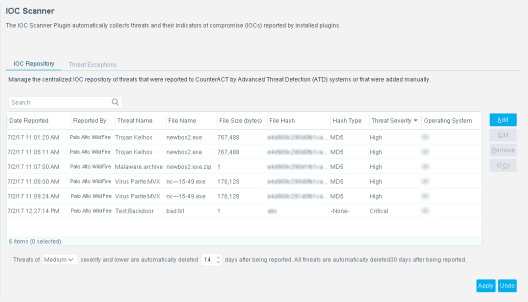
- Use the eyeSight inventory tools to display all threats reported by Palo Alto Networks WildFire in the last 30 days and the endpoints for which WildFire reported them. For example, identify multiple endpoints detected with the same threat and analyze any shared endpoint characteristics that may be useful for determining how the threat has moved through your network.
To use the module, you should have a solid understanding of Palo Alto Networks WildFire concepts, functionality, and terminology, including an understanding of how to leverage threat intelligence distributed by IOCs. You should also understand how eyeSight policies and other basic features work.
 minute read