eyeInspect Content Distributor v1.0.0 Commands
The eyeInspect Content Distributor v1.0.0 commands are grouped into the following types:
-
Built-in commands - general system commands
-
-
Command Center configuration commands - to list, delete, add and change passwords of Command Centers
-
Distribution configuration commands - to create and list templates for distribution of files
-
-
Query commands:
-
Engine query commands - to backup, start, list, pause, search, add and delete engines
-
Sensor query commands - allows you to list the connected sensors to a given Command Center
-
-
Distribution commands - to distribute files from templates, with parameters or in interactive mode
In general, a command is either:
-
Standalone, without any arguments. For example: cc list, or
-
Contains one or more arguments. For example: cc delete --address <command_center_address>
To see a list of commands and their descriptions, type in the
help command. This lists all available commands along with brief
descriptions.
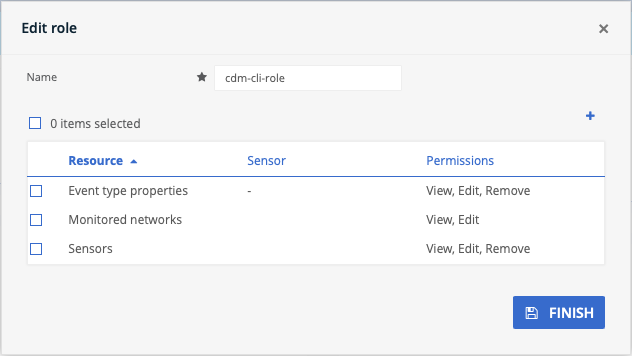
Minimum User Permissions for Command Centers
To run commands, users need the following minimum permissions:
| Resource Name | Permissions | Commands |
|---|---|---|
| Sensors | View, Edit, Remove |
|
| Monitored Networks | View, Edit |
|
| Event Type Properties | View, Edit, Remove |
|
Built-in Commands
The following built-in commands are available for the eyeInspect Content Distributor:
| Command | Description |
|---|---|
|
help |
Displays help information about all available commands |
| stacktrace | Displays the full stacktrace of the last error |
| clear | Clears the shell screen |
| quit (or) exit |
Exits the shell |
| history | Displays or saves the history of previously run commands |
| version | Shows version info |
| script | Reads and executes commands from a file |
Configuration Commands
The following configuration commands are available for the eyeInspect Content Distributor:
Command Center Configuration Commands:
| Command | Description | Arguments | Output |
|---|---|---|---|
| cc list | Lists the available Command Center configurations | --refresh (this is an optional argument, it refreshes the
Command Center connectivity status) --help or -h (this is an optional argument, it displays the help options for cc list) |
Command Center address=$address, hostname=$hostname, version=$version, username=$username, status=$status |
Example: eyeinspect:> cc list Command Center address=<CC_IP_Address>, hostname=<command_center_hostname>, version=<command_center_version>, username=admin, status=Connected eyeinspect:>cc list --refresh *** Checking connectivity status of Command Centers *** Successfully connected to Command Center at <CC_IP_Address> *** Connectivity status of Command Centers checked *** Command Center address=<CC_IP_Address>, hostname=<command_center_hostname>, version=<command_center_version>, username=admin, status=Connected |
|||
| cc delete | Deletes a Command Center configuration | --address: Command Center address |
Confirmation message:
Output:
|
Example: eyeinspect:> cc delete --address <CC_IP_Address> ? Do you confirm that the configuration of Command Center with address <CC_IP_Address> will be deleted? true Configuration of Command Center with address <CC_IP_Address> has been deleted. |
|||
| cc add Note: If you add a new Command
Center using an address that is already assigned to an existing Command Center,
the existing one will be replaced with the new one. |
Adds a Command Center configuration Note: You can only
add Command Centers version 5.2 or higher. |
--address: Command Center address --username: Command Center username --port: Command Center port [Default: HTTPS(443)] [Optional] |
Password input: ? Enter password for $username ******** Output: Configuration of Command Center with ip $ip is added |
Example:
eyeinspect :> cc add --address <CC_IP_Address> --username cdm-cli Enter password for cdm- cli ******** Configuration of Command Center with address <CC_IP_Address> is added. |
|||
|
cc change-password |
Changes user credentials for an existing Command Center configuration | --address: Command Center address |
Password input: ? Enter password for $username ******** Output: Password for Command Center with ip $ip is updated. |
|
Example: eyeinspect:> cc change-password --address <CC_IP_Address> ? Enter password for cdm-cli ******** Password for Command Center with address <CC_IP_Address> is updated. |
|||
Distribution Configuration Commands:
| Command | Description | Arguments | Output |
|---|---|---|---|
| template create | Creates a distribution task template in interactive mode |
? Select content type to distribute:(List of supported content types.) ? Select a content file to be distributed:(List of content files based on the selected type) ? Select Command Centers:(List of Command Centers added to CLI tool) ? Input task template name(Default value will be selected content file name without extension) |
The content distribution template is saved to the file ${template-filename}.The sensor list can be modified and the distribution task can be initiated by calling `distribute from-template ${template-filename}` |
Example:
eyeinspect:> template create ? Select content type to distribute: SD_SCRIPT ? Select content file to be distributed: <file_name.zip> ? Select Command Centers: <CC_IP_Address> ? Input task template name: <task_template_name> The content distribution task template is saved to the file <file_name.json>. The sensor list can be modified and the distribution task can be initiated by calling ‘distribute from-template <file_name.json>‘ |
|||
| template list | Lists distribution task templates |
The list of content distribution task template files: $template-filename-1 $template-filename-2 The sensor list can be modified and the distribution task can be initiated by calling `distribute from-template <template-file> |
|
Example:
eyeinspect:> template list The list of content distribution task template files: <file_name.json> The sensor list can be modified and the distribution task can be initiated by calling 'distribute from-template <template_file>' |
|||
Query Commands
The following query commands are available for the eyeInspect Content Distributor.
sensorId (sensor identifier) argument becomes mandatory as there could
be multiple sensors with the same IP address.
| Command | Description | Arguments | Output |
|---|---|---|---|
| engine list | Lists available engines for the given sensor |
--address: Command Center address --sensorAddress: Sensor address connected to given Command Center |
Sensor id=$id, name=$name, address=$address, version=$sensorVersion, type=$type, state=$state Sensor Engine id=$id, name=$name, type=$type, state=Active/Paused |
|
Example eyeinspect:> engine list --address <engine_address> --sensorAddress <sensor_address>
Sensor id=<sensor_id>, name=<sensor_name>, address=<sensor_address>, version=<sensor_version>, type=PASSIVE, state=Active
Sensor Engine id=<engine_ID>, name=<file_name>, type=SDSCRIPT, state=Active
Sensor Engine id=<engine_ID>, name=<file_name>, type=SDSCRIPT, state=Active
|
|||
| engine search | Queries engines with the given i-like name and lists the found engines | --engineName: Engine i-like name. Note: The i-like name is compared against all engine
names, and any match found is returned. |
Output:
|
|
Example eyeinspect:> engine search threat 1 engines are found with i-like name threat <engine_name> Sensor Address=<sensor_address> / Sensor Engine id=<engine_ID>, name=<file_name>, type=SDSCRIPT, state=Paused |
|||
| engine backup | Backs up the .profile file of the engine |
--address: Command Center address --sensorAddress: Sensor address connected to given Command Center --engineId: Engine identifier --sensorId: Sensor identifier (Optional except in bundled configurations - see note above table)
Note: The .profile file is located in the
"/home/silentdefense/base/export/engine" folder.
|
Engine backed-up to file $fileName. |
|
Example eyeinspect:> engine backup --address <engine_address> --sensorAddress <sensor_address> --engineld <engine_ID> Engine backed up to file <file_name.profile> |
|||
| engine add | Adds an engine from a profile file |
--address: Command Center address --sensorAddress: Sensor address connected to given Command Center --fileName: Filename of .profile file --sensorId: Sensor identifier (Optional except in bundled configurations - see note above table)
Note: The .profile file is located in the
"/home/silentdefense/base/export/engine" folder. Include the full file path,
as seen in the example below.
Note: When an engine is added from a backup file, the
engine state will be Paused.
|
Engine imported: Sensor Engine id=$id, name=$name, type=$type, state=Active/Paused |
|
Example eyeinspect:> engine add --address <engine_address> --sensorAddress <sensor_address> --fileName "/home/silentdefense/base/export/engine/<file_name.profile>" Engine imported: Sensor Engine id=<engine_ID>, name=<file_name>, type=SDSCRIPT, state=Paused |
|||
| engine delete | Deletes the given engine |
--address: Command Center address --sensorAddress: Sensor address connected to given Command Center --engineId: Engine identifier --sensorId: Sensor identifier (Optional except in bundled configurations - see note above table) |
Engine deleted: Sensor Engine id=$id, name=$name, type=$type, state=Active/Paused |
|
Example eyeinspect:> engine delete --address <engine_address> --sensorAddress <sensor_address> --engineId <engine_ID> Engine deleted: Sensor Engine id=<engine_ID>, name=<file_name>, type=SDSCRIPT, state=Active |
|||
| engine start | Starts the given engine |
--address: Command Center address --sensorAddress: Sensor address connected to given Command Center --engineId: Engine identifier --sensorId: Sensor identifier (Optional except in bundled configurations - see note above table ) |
Engine started: Sensor Engine id=$id, name=$name, type=$type, state=Active/Paused |
|
Example eyeinspect:> engine start --address <engine_address> --sensorAddress <sensor_address> --engineId <engine_ID> Engine started: Sensor Engine id=<engine_ID>, name=<file_name>, type=SDSCRIPT, state=Active |
|||
| engine pause | Pauses the given engine |
--address: Command Center address --sensorAddress: Sensor address connected to given Command Center --engineId: Engine identifier --sensorId: Sensor identifier (Optional except in bundled configurations - see note above table) |
Engine paused: Sensor Engine id=$id, name=$name, type=$type, state=Active/Paused |
|
Example eyeinspect:> engine pause --address <engine_address> --sensorAddress <sensor_address> --engineId <engine_ID> Engine paused: Sensor Engine id=<engine_ID>, name=<file_name>, type=SDSCRIPT, state=Paused |
|||
| Command | Description | Arguments | Output |
|---|---|---|---|
| sensor list | Lists the connected sensors to the given Command Center | --address: Command Center address | Sensor id=$id, name=$name, address=$address, version=$sensorVersion, type=$type, state=$state |
Example:
eyeinspect:> sensor list --address <sensor_address> Sensor id=<sensor_ID>, name=<sensor name>, address=<sensor_address>, version=<sensor_version>, type=PASSIVE, state=Active |
|||
Distribution Commands
The following distribution commands are available for the eyeInspect Content Distributor:
| Command | Description | Arguments | Output |
|---|---|---|---|
| distribute | Executes distribution task in interactive mode | ? Select content type to distribute:(List of supported content types.) ? Select a content file to be distributed:(List of content files based on the selected type.) ? Select Command Centers:(List of Command Centers added to CLI tool) ? Given content will be distributed to selected Command Centers and older content will be removed from the Command Centers. Do you confirm?(Ask for confirmation. Positive confirmation input: Y/n) | Positive confirmation: Same as the output of thedistribute with-paramscommand.Negative confirmation: Content distribution task can be initiated by executing the command
|
Example: eyeinspect:> distribute ? Select content type to distribute: CVE_IOC_BUNDLE ? Select content file to be distributed: <file_name.zip> ? Select Command Centers: <CC_IP_Address> ? Given content will be distributed to all sensors connected to selected Command Centers. Do you confirm? true File successfully distributed to all selected Command Centers. To know more about the unsuccessful distribution and other details check: <file_name.csv> | |||
| distribute with-params | Executes distribution task with parameters | --taskType: Distribution task type. Available values: [CVE_IOC_BUNDLE, SD_SCRIPT] --fileName: File name of the content. --selectedCommandCenterIPs: Selected comma-separated Command Center IP addresses | CVE_IOC_BUNDLE: File distribution was successful for {} out of {} selected Command Centers. For any unsuccessful distributions, a template file ({template-file}) has been created, allowing you to retry the distribution process using the distribute from-template {template-file} command. Refer to the log file for more details: {csv-log-file}
SD_SCRIPT: File distribution was successful for {} out of {} selected Command Centers. Details of failed distributions per Command Center: Command Center [{address}]: Distribution to (all)/({} out of {}) sensor(s) has failed. For any unsuccessful distributions, a template file ({template-file}) has been created, allowing you to retry the distribution process using the distribute from-template {template-file} command. Refer to the log file for more details: {csv-log-file} |
Example: eyeinspect:> distribute with-params --taskType CVE_IOC_BUNDLE --fileName <file_name.zip> --selectedCommandCenterIPs <CC_IP_Address> File successfully distributed to all selected Command Centers. To know more about the unsuccessful distribution and other details check: <file_name.csv> | |||
| distribute from-template | Executes distribution task from a template | --templateFile: The file name of the distribution task
template.--contentFile[Optional]: The file name of the new content. Note: If the contentFile argument is not given, the
distribution takes the name of the .json file. | Same as the output of the distribute
with-paramscommand. |
Example: eyeinspect:> distribute from-template <file_name.json> File successfully distributed to all selected Command Centers. To know more about the unsuccessful distribution and other details check: <file_name.csv> | |||
Note: The .csv files referenced to in the three Distribution
Commands examples above are located at ${BASE_PATH_HOST}/
log/*.csv, where * is the name of the CSV file. | |||
 minute read