Configure High Availability between the Primary and Secondary Command Centers
Pre-requisites
- Ensure that the two appliances (to be used as Primary and Secondary Command Centers) are configured as Command Center nodes.
- The two Command Center appliances must have the same eyeInspect version.
- Ensure that the ports TCP/22 (SSH on secondary host) and TCP/5432 (Postgresql on primary host) are not blocked by network devices in their path.
Note: The Rotate Passphrase feature will not work post
enabling High Availability. If required, perform this task before enabling High
Availability.
Step-by-step Procedure
- Connect to the node that you want to designate as the Primary Command Center - for example, 192.168.56.101 - via SSH.
- Execute the command
sudo sdconfig. - From the eyeInspect configuration menu, choose Command Center High Availability.
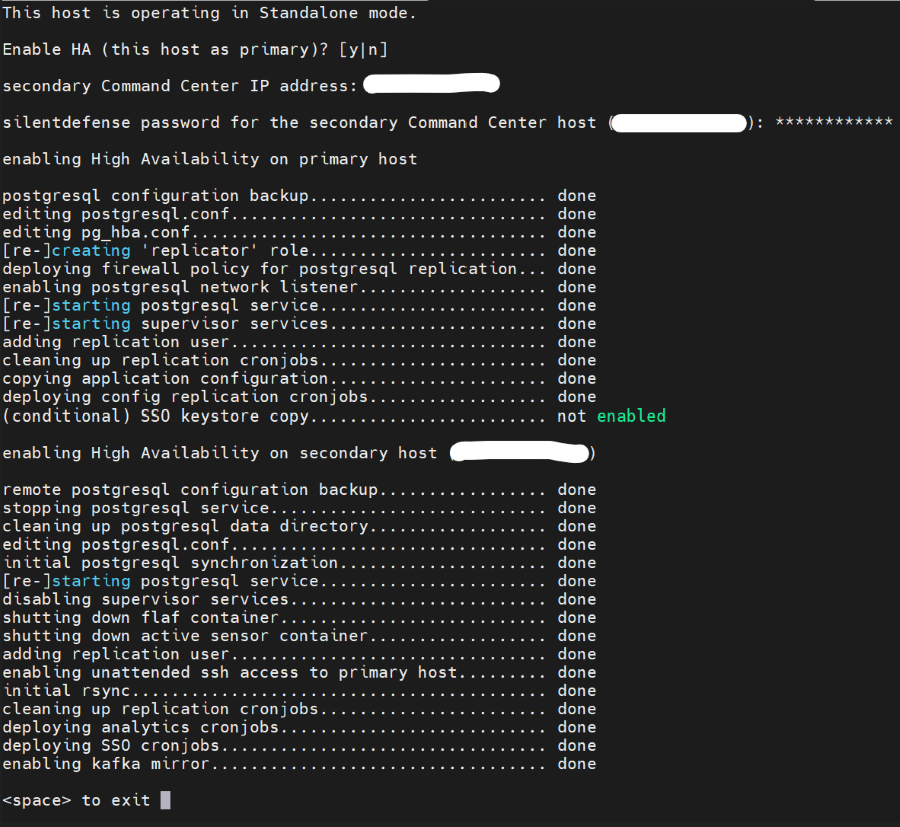
- Press "y" to enable the Command Centers as Primary and Secondary.
- Enter the IP address of the Secondary Command Center - for example, 192.168.56.102.
- Enter the silentdefense password for the Secondary Command Center host.
- The on-screen message confirms that both the Command Centers have been successfully configured as Primary and Secondary Command Centers.
- Press "space" as displayed in the terminal to exit the replication process.
- Select Exit to exit the sdconfig menu.
Here’s how the process looks in the terminal:
 minute read