Disable High Availability Configuration on the Command Center
It is possible to disable the High Availability configuration from both Primary and Secondary Command Centers, for example when the High Availability is no longer necessary or the secondary eyeInspect Command Center is being decommissioned.
Disabling the High Availability configuration for both Command Centers (primary and secondary) can be done from the Primary Command Center itself:
- From the Primary Command Center, execute the sudo sdconfig command to launch the eyeInspect configuration menu.
- From the eyeInspect configuration menu, select Command Center High Availability.
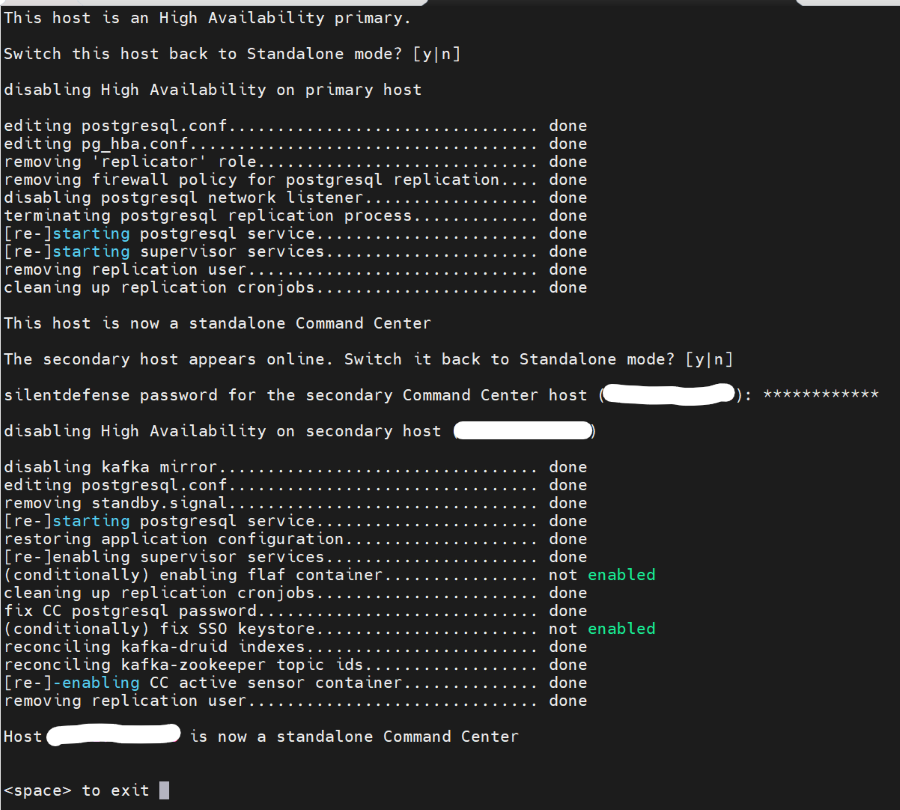
- A message about the current node (Primary or Secondary) is presented, along with a prompt to disable the High Availability.
- Press the "y" key to start the disabling process.
- After High Availability is disabled in the Primary Command Center, a message to switch the Secondary Command Center to Standalone mode is shown.
- Press the "y" key to disable High Availability for Secondary Command Center as well.
- Enter the ‘silentdefense’ password for the Secondary Command Center host.
- Wait for the confirmation message to be displayed on screen and press the spacebar key (as shown in the terminal) to exit.
- Select Exit to exit the sdconfig menu.
Here’s how the process looks in the terminal:
 minute read