Customize scan recognition criteria
You can customize the scan recognition criteria for specific types of scan events. For each scan type, you can define the number of probe events that must occur within a specified period for the system to identify the probing endpoint. This is referred to as a probe count.
In addition, the system supports various scan methods for each scan type available. For example, a Login scan can be performed using the password scan or user scan method. Customization tools let you define different scan criteria for each scan method. For example, you can require endpoints using the Login password method to perform one probe within one day to be monitored, while endpoints using the Login user method are required to perform nine probes within one day to be monitored.
To customize scan recognition parameters:
- Select , and then select Threat Protection.
- At the bottom of the Threat Protection pane, select Customize and then select the Scan tab.
- Select a Scan Parameter row and select Details. The relevant Details dialog box opens.
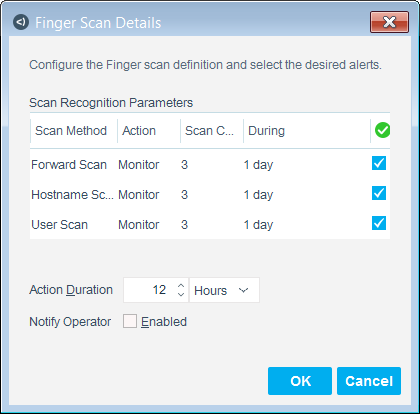
- Double-click the Action field to define how Forescout eyeControl will handle this scan.
- Double-click the Scan Count field to define the number of probe events that must occur within a specified period for the system to identify the probing endpoint activity as a scan.
- Double-click the During field to adjust the time interval in which the events must occur.
- Verify that the checkbox is selected to enable detection of a specific scan method. Clear the checkbox for the system to ignore the event.
- Update the Action Duration field to adjust the time interval in which the system blocks or monitors these endpoints. The value is applied to all methods listed. Use the drop-down menu to assign a unit of time.
- Enable Notify Operator to send email notification to designated operators when the event occurs.
- Select OK to save your changes and close the dialog box.
 minute read