Health monitoring policies template
Use the templates in this folder to create policies that support Appliance health monitoring, to create an out-of-the-box Health Monitoring dashboard in the eyeSight Web Client Dashboards view, and to populate widgets in this dashboard with relevant data.
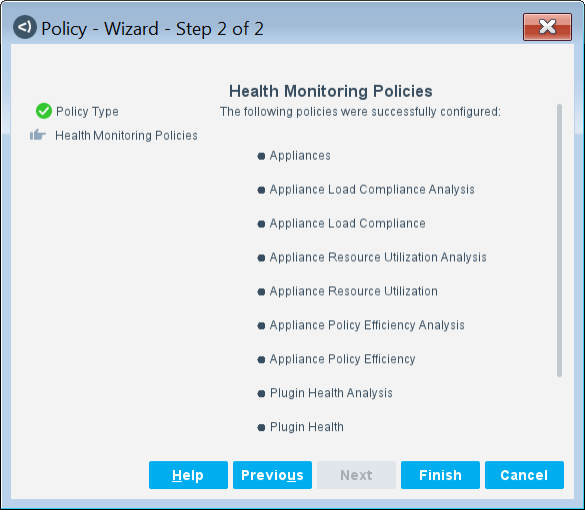
Run this template to create the following policies:
- Appliances Policy
- Appliance Load Compliance Policies
- Appliance Resource Utilization Policies
- Appliance Policy Efficiency Policies
- Plugin Health Policies
To run the template:
- Log in to the Console and select the Policy tab.
- (Recommended) Create a new folder to hold the default Health Monitoring policies.
- Select the folder and select Add from the Policy Manager. The Policy Wizard opens.
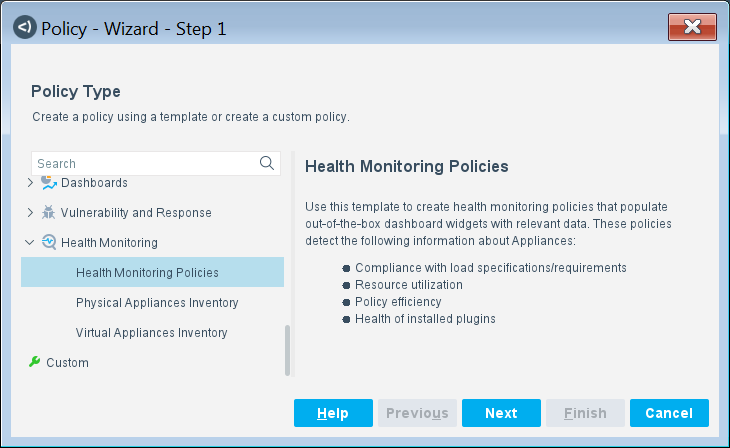
- Expand the Health Monitoring folder and select Health Monitoring Policies.
Policy Wizard-Health Monitoring Policies-Policy Type
- Select Next. The Health Monitoring Policies pane opens, displaying a summary of the policies that have been activated.
Policy Wizard-Successfully Configured Policies
- Select Finish.
- Select Apply to save the policy settings.
 minute read