The Certificates pane
The Certificates pane simplifies handling of trusted and system certificates in Forescout.
The Certificates pane replaces previously used fstools features. Certificates used in earlier versions of eyeSight are automatically migrated, along with their scopes, to the System Certificates and Trusted Certificates tables.
Each certificate is associated with one or more Forescout services, or with applications running on one or more eyeSight devices. This allows different certificates to be used for different Forescout sub-systems running on different devices.
Access the Certificates pane at .
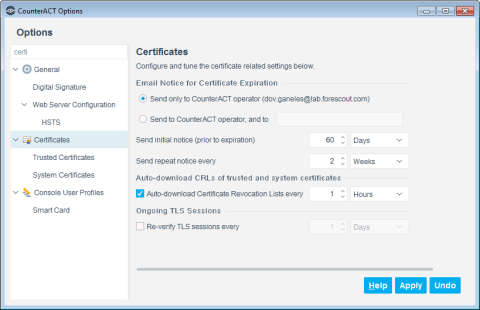
Certificate general settings
Configure general options for certificates defined in Forescout at .
Enable and configure automatic emails when certificates near expiration. Select one of the following options.
Specify time intervals for email notification.
Enable and configure automatic emails when certificates near expiration. Select one of the following options.
Specify time intervals for email notification.
Ongoing TLS sessions
The time interval at which Forescout verifies the certificate of existing TLS sessions. Ongoing TLS sessions may be kept alive for performance reasons - for example, the User Directory plugin connection to the Active Directory server is used more many requests. By default, this option is disabled.
Certificate scope settings
Scope settings determine which eyeSight sub-systems and devices can accept or present a certificate.
Enable and configure automatic emails when certificates near expiration. Select one of the following options.
Specify time intervals for email notification.
Certificate precedence between Appliance and Enterprise Manager
When you add an Appliance to an Enterprise Manager, the certificates of one may take precedence over the other.
When the first Appliance is added to an Enterprise Manager, you can copy the full Appliance configuration, including certificates, to the Enterprise Manager, or define certificates from scratch.
When another Appliance is added to an Enterprise Manager:
- Typically the Enterprise Manager has no certificates with a scope that includes the Appliance. The Appliance certificates are pushed to the Enterprise Manager and scoped for the Appliance.
- When the Enterprise Manager has certificates whose scope covers the Appliance (for example, when the configured scope is All Devices) , the Enterprise Manager certificates take precedence, and the Appliance certificates are removed. To retain the Appliance certificates, export them to a file before you add the Appliance to the Enterprise Manager, and import them after the Appliance is added.
Manage trusted certificates
eyeSight components and services use the trusted certificates defined in Forescout to authenticate certificates presented by external applications.
Certificates are trusted only if the issuer chain they present ends with a trusted certificate authority (CA). You can define the scope of services or devices in your eyeSight deployment for which each certificate is accepted.
Manage system certificates
Forescout presents system certificates to external services and applications.
Ensure that each subsystem is scoped to the correct certificate on every device on which it runs.
 minute read