Choosing the right solution for your deployment
The table below describes when to use each solution for a Standalone or group of Appliances within your deployment, based on the details of your deployment and/or business needs. You can also use both solutions in parallel.
To see the network architecture of a sample deployment, and how each solution can address the needs of this deployment, read the following sections:
- Deployment Example: Network Architecture
- Deployment Example: Addressing Your Needs
High Availability Pairing
Failover Clustering
Dedicated Appliances:
Appliances with a Connecting Forescout Device (Focal Appliance) serving as a proxy to a 3rd party server.
Appliances that need to be configured on a 3rd party server.
For example:
Appliances that receive SNMP traps from switches and controllers
Appliances that monitor a network SPAN port to see network traffic
Appliances where plugins or features are configured individually per Appliance instead of globally for all Appliances.
Appliances can access network devices and endpoints managed by other Appliances:
-
Appliances at the same location (e.g., the data center)
-
Appliances from larger site can access network devices and endpoints from a smaller site
-
Appliances behind load balancers
Isolated Appliances:
Appliance at a remote site with no access to other parts of the network that it is not handling.
-
Deployment Example: Network Architecture
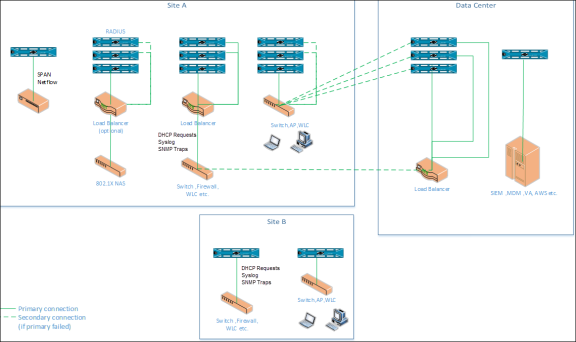
The diagram below shows an example of a deployment with the following components:
- One data center and two sites, Site A and Site B
-
Data center.
- Focal Appliance connected to, for example, a SIEM server
-
Site A. Appliances in the data center can access some of the site’s traffic. This site includes, for example:
- A switch that the data center can access
- A firewall that sends traffic to a load balancer in site A and is also configured to send traffic to a load balancer in the data center as a secondary connection in case the primary fails
- An 802.1X NAS device configured with secondary/tertiary RADIUS servers
- An Appliance monitoring a network SPAN port
-
Site B. Appliances in the data center cannot access the site’s endpoint traffic or its network devices. This site includes, for example:
- An Appliance receiving SNMP traps or DHCP requests from a switch
- An Appliance managing endpoints and switch/wireless devices/access points
Deployment Example: Addressing Your Needs
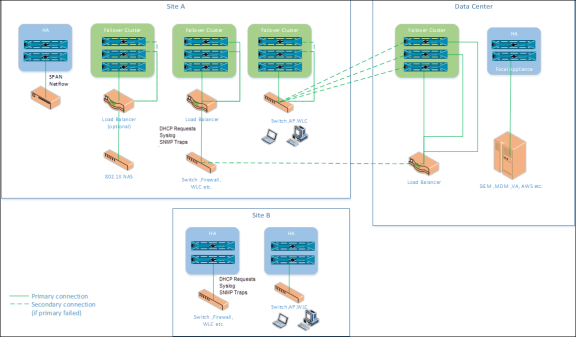
The diagram below shows how each Resiliency solution addresses the various needs of the example deployment described above.
- All dedicated Appliances require a High Availability pair
- The Focal Appliance in the data center
- The Appliance monitoring a network SPAN port in Site A
- Isolated Appliances require a High Availability pair
- The Appliances in Site B, where other Appliances cannot access the traffic
- All other Appliances in the data center and Site A should use Failover Clustering since these Appliances can take over for one another in case of failure.
 minute read