Forescout eyeSight high availability pairing
A high availability system provides you with standby support in the event of system malfunction or failure. It is implemented in pairs of two eyeSight devices; either two Appliances or two Enterprise Managers. Redundancy is achieved by assigning an Active node to manage activities required for effective NAC, and a Standby node to take over in case the Active node fails. The two nodes are synchronized by a redundant pair of interconnecting cables.
- Primary Node: the node you use to set up high availability. It is initially the Active node.
- Secondary Node: the node that you set up to take over if the primary node fails. It is initially the Standby node.
- Active Node: The active node manages your environment. Only one node is active at a time.
- Standby Node: The operating system on the passive node is active and ready to be used as the failover system.

The following Appliances are not supported for deployment in High Availability pairs:
- CT-R
- VCT-R
- 4130
- 5110
- Flexx Virtual x-small machine
Communication with the Forescout eyeSight High Availability System
You will normally need to communicate with the high availability pair (and not the individual eyeSight devices that make up the pair). Use 22/TCP to access the eyeSight CLI of the shared (virtual) IP address of the pair.
If you need to access a physical CounterACT device that is part of the high availability pair, use 2222/TCP. Note that the CLI prompt in this case begins with Miniroot.
Many commands (in particular, fstool service status) work on the shared IP address only. Running them at the Miniroot prompt does not work.
Switch connectivity
Examples of high availability pair-switch connections follow. In the relevant examples, the switch must support Dual Span sessions.
Example 1:
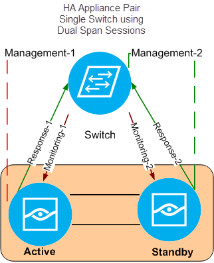
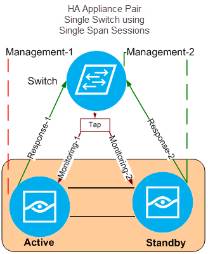
Example 2:
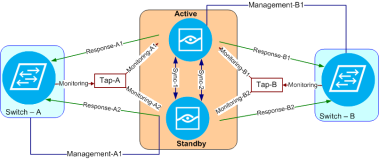
Example 3:
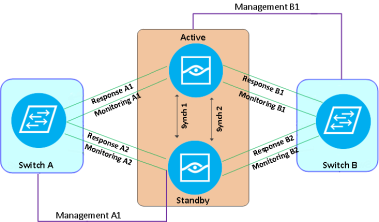
Connecting to the Forescout eyeSight network
This topic shows sample ports and connectors for a single device.

Sample Appliance Rear Panel - CT-xxxx Appliance (above), and CT-1000 - Sample Connections (below)
| Interface | Cable | Interface | Cable | |
|---|---|---|---|---|
|
eth0 |
Management-1 |
eth4* |
Monitoring-2* |
|
|
eth2 |
Monitoring-1 |
eth5* |
Response-2* |
|
|
eth3 |
Sync-1 |
eth7 |
Sync-2 |
|
|
eth1 |
Response-1 |
*Only for redundant switch configuration.
Forescout eyeSight high availability failover
The Active and Standby nodes are monitored every second for operational updates. By default, failover from the Active node to the Standby node occurs 60 seconds after the Standby node detects that the Active node is down.
The Standby node becomes the Active node typically within 10 minutes or more after the Active node fails.
Forescout eyeSight Active and Standby node status
The status of the Active and Standby nodes is affected by restarts as follows:
- Restart Active node: In case the Active node fails, the Standby node becomes the Active node (swapping roles). After restart, the switchover remains in effect; that is, the Active node that originally failed remains the Standby node, and the newly appointed Active node continues with that role.
- Restart Standby node: After restarting the Standby node, the Active/Standby roles do not change.
- Both nodes are restarted: Depending on which node restarts first, the nodes can remain as originally designated or assume reverse roles; the first node to restart becomes the Active node.
Forescout eyeSight failover triggers
Full high availability mode requires that both nodes are up and that the Standby node is synchronized with the Active node and is fully up to date.
When full high availability mode is in effect, any of the following cause the Standby node to become the Active node:
- System failure: Active node outage
- System failure: Disk or RAID storage failure within the Active node (for example, RAID array breakdown where some disks are not functioning).
- System maintenance: Active node powered off or cold boot occurred
- Management interface failure: A management interface hardware failure on the Active node. Failover occurs in this case only if you defined pingable hosts during the high availability setup.
- Triggering failover with a manual command. On the Active node, use the command:
fstool ha stop -f
 minute read