Configure Switches and Controllers in IP Reuse Domains
Switches and wireless controllers interact with two Appliances:
- The Connecting Appliance you specify when you add the device in the Switch Plugin or Wireless plugin configuration pane.
- The Appliance that handles the switch’s IP address, as defined in the Appliance tree.
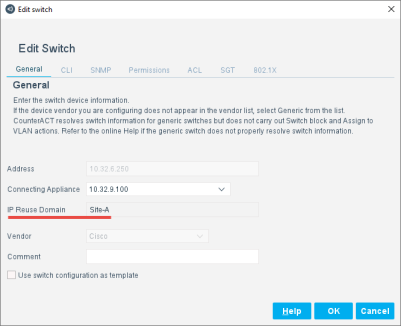
To report endpoints with overlapping IP addresses, switches or controllers in an overlapping site must be managed by a Connecting Appliance with the IP Reuse Domain of that site. Endpoints reported by these devices receive the IP Reuse Domain of the Connecting Appliance. Switch and controller deployment should parallel IP Reuse Domains so that endpoints can be resolved to an IP Reuse Domain.
To configure multiple switches with an overlapping IP address, recall that each switch interacts with two Appliances:
- The Connecting Appliance
- The Appliance that handles the switch’s IP address
Both these Appliances must be in the same IP Reuse Domain for each switch.
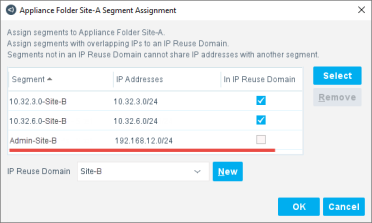
When the IP address of a switch or controller is unique, you can place it in the default/global network, not in an IP Reuse Domain. Typically, a segment containing this IP address is included in the Appliance folder that handles the overlapping site, but the In IP Reuse Domain checkbox is cleared for this segment.
 minute read