Resolving Cases
Clicking Resolve on the Case Details page opens the Resolve Case window.
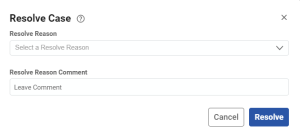
Here you can resolve the Case with an explanation that provides context. The resolved Case record is stored for future lookup and analysis.
When resolving a Security Incident, you must specify the Impact, Category, Cyber Kill Chain and Entity fields if the Analysis field contains content. Otherwise the case cannot be set to resolve.
- RESOLVE REASON – Specifies the understanding with which the
case was resolved, as follows:
- Benign True Positive: Specifies that the system and/or analyst(s) accurately detected that the event was a potentially threatening Security Incident, but it can be dismissed as non-threatening in this instance.
- False Positive: Specifics that the system and/or analyst(s) misidentified the event as a potentially threatening Security Incident, and it can be dismissed.
- Fixed: Specifies that a Change Request has been satisfied.
- Indeterminate: Specifies that no determination can be made as to the legitimacy of the Security Incident or its resolution.
- Malicious True Positive: Specifies that the security event was a legitimately threatening Security Incident, but its effects cannot be mitigated.
- Other: Specifies a reason not covered by the preset choices that can be elaborated upon in the RESOLVE REASON COMMENT field.
- Allow-List: Adds the profile of the Security Incident to a white list of benign true positives.
- Duplicate, Link to Parent: Identifies the Case as a duplicate or otherwise related to a separate parent Case. You can search for or select a parent Case using the Case Id..
- Rule Tuning: The Rule that triggered the Detection will be tuned (e.g., to reduce the likelihood of future false positives).
- RESOLVE REASON COMMENT – Provides a space to elaborate in detail on the nature and context of the Case resolution.