Generate an API key for application integration
API Keys from Forescout allow you to query applications or integrations for data. This can be used for configuring integrations for health alerts, log queries, risk sharing, case management, and more.
To generate an API key for your custom application:
- In Forescout Cloud, go to Administration > API Key Management.
- In the appropriate category for your application (IoT/OT or SIEM), click the
Generate API Key button. The Generate API Key configuration
drawer opens.
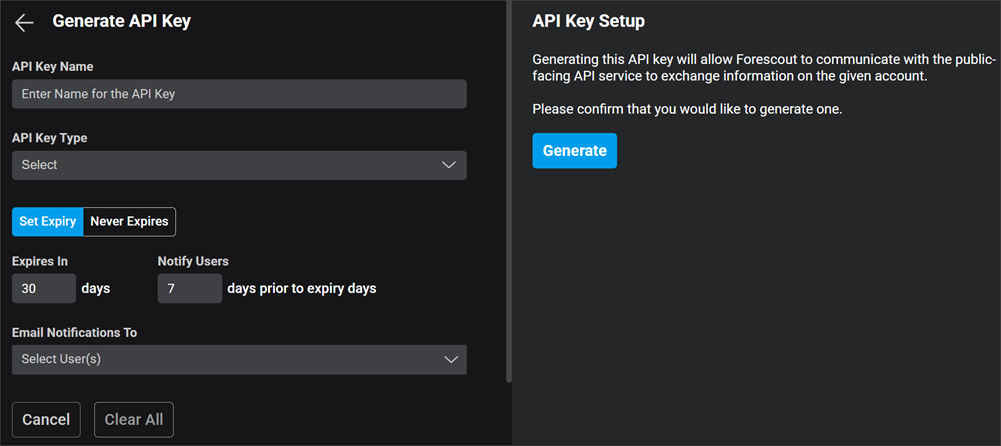
- Provide a distinct API Key Name.
- Select the API Key Type:
- Health Alerts: For appliance or system health (CPU, memory, storage, stability, and hardware alerts).
- Log Query API: For log ingestion and parsing rules.
- Risk Sharing API: For retrieving detection and asset data (if
configuring Cloud Data Exchange [CDE]).When generating an API key for Risk Sharing applications, the configuration screen will display the API endpoint URL needed to communicate with the API.
- Select a time for the API key to expire with Set Expiry or select Never Expires.
- If there is a set expiration period, specify the number of days prior to expiry to Notify Users, and then select the user(s) to send an email notification to regarding the API key.
- Click the Generate button and copy the API key that appears. This API key is unique and non-retrievable once the window is closed. Store the key in a secure location now; it will be needed by the application with which you are integrating.
 minute read