Alert Center
The Alert Center is the place to view and manage your health Alerts, and to work specific Alerts into SOAR notification workflows.
The Alert Logs tab displays a list of all Appliance alerts over the specified time range, and presents summary information as follows:
- Alert Name
- Description
- Alert Count
- Last Occurrence
- Appliances with the Same Alert
- Notification Count
Time Range drop down: Use the Time Range drop down to select from preset time ranges or to specify a custom time range.
Export to CSV: Exports the Alert Center table to a file in .CSV format and downloads it to your computer.
Search: Searches the Alert Center table for the values you specify and filters displayed information accordingly.
Filter: Use the filter to narrow the information presented by the Alert Center view. Click Filter to open the Filters configuration window and use the Enterprise Manager Hostname field to specify the Enterprise Manager hosting Appliances. For each Appliance filter element, use the Condition drop down to select from one of the following expressions:
- Equals
- Not Equals
- Alerts: Filters the view for one or more Alert types.
- Appliances: Filters the view for one or more specific Appliance(s).
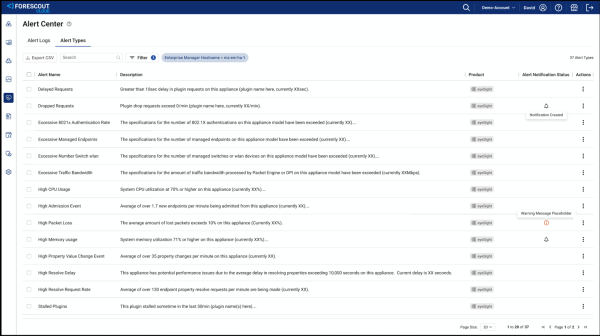
The Alert Types tab displays a list of the available Alerts and the ability to work them into SOAR notification workflows.
Search field: Filters the list for Alert Types that match the specified characters.
Filter: Use this to filter the list for specific Alert Types and products.
Export CSV: Exports the currently displayed list to a CSV file and downloads it to your local machine.
The list table shows the following columns of information for Alert Types:
- Name
- Description
- Product
- Alert Notification: Indicates whether an alert notification is currently configured for the Alert.
- Action: Click the kebab to create a SOAR alert notification or to view SOAR integrations.
 minute read