Compliance and Posture Dashboard
Selecting Compliance and Posture from the Dashboards menu displays the Compliance and Posture Dashboard.
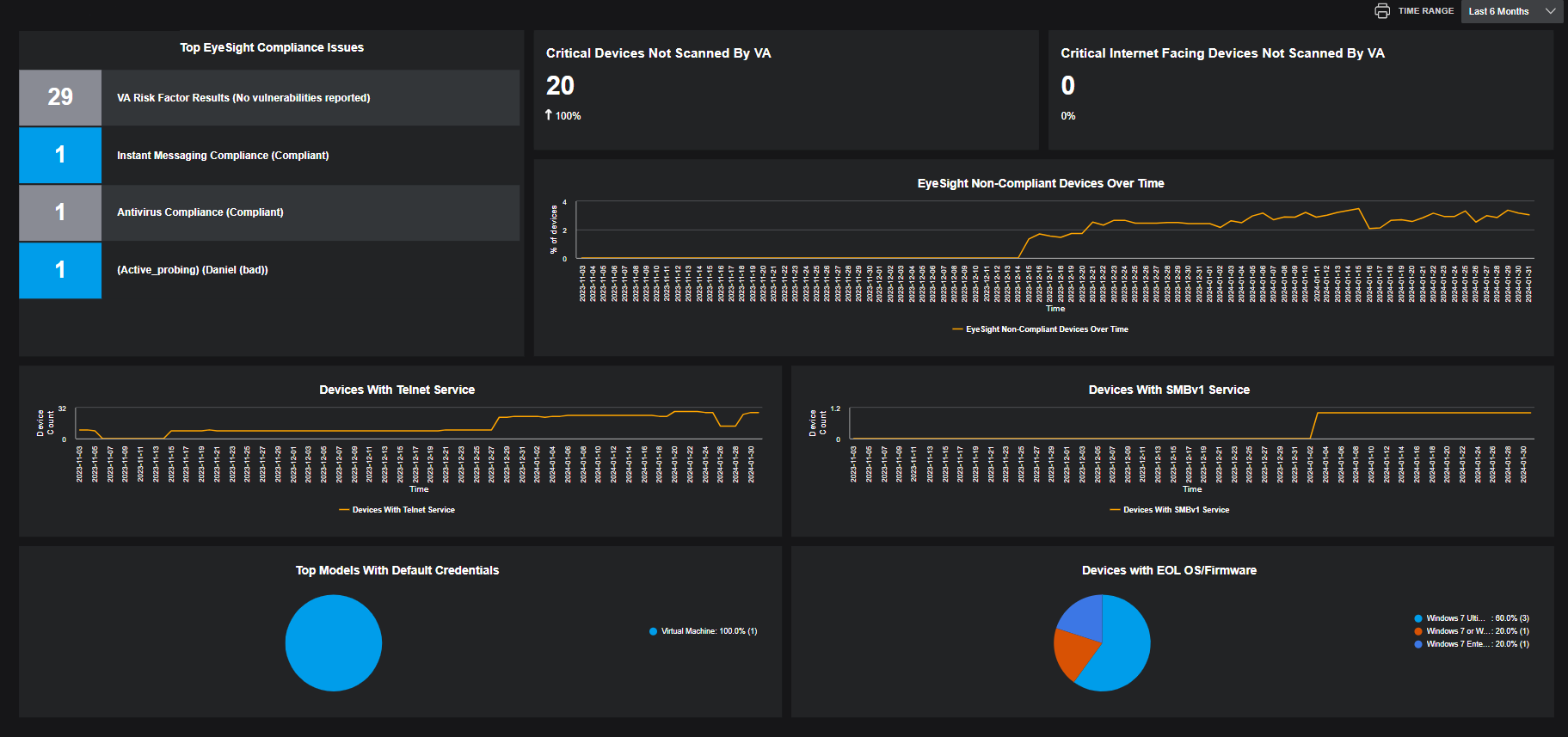
The Compliance and Posture Dashboard provides a snapshot of the risk-oriented elements of your network, including the following:
- Filters button: Use the Filters button to refine displayed data to your preferences. The filter is identical to the one used to refine data on the Assets screen.
- Time Range Filter: Specifies the time range for displayed data.
- Top eyeSight Compliance Issues: Lists the most frequently noted eyeSight compliance issues.
- Critical Devices Not Scanned by VA: Lists critical devices that have not been scanned for vulnerability assessment.
- Critical Internet Devices Not Scanned by VA: List critical internet devices that have not been scanned for vulnerability assessment.
- eyeSight Non-Compliant Devices Over Time: Shows the how the percentage of non-compliant devices is trending over time.
- Devices with Telnet Service: Lists the devices that have the Telnet service enabled.
- Devices with SMBv1 Service: Lists the devices that have the SMBv1 service enabled.
- Top Models with Default Credentials: Lists the top device models that are using the vendor's default authentication credentials.
- Devices with EOL OS/Firmware: Lists devices that have passed the end of life mark for operating system and/or firmware.
You can click on specific data shown in a widget to drill immediately to the Asset data that populated it.
 minute read