Manage Operational Technology Endpoints in eyeSight
Endpoints in Operational Technology/automation environments have unique functional requirements. This topic describes configuration settings, tools, and methods to manage these endpoints using the eyeSight-eyeInspect integration.
Passive Management of Sensitive Endpoints
Mission-critical Operational Technology endpoints cannot tolerate active management contact from eyeSight.
To manage these endpoints passively:
- If possible, use Segment Manager to organize sensitive endpoints in dedicated segments.
- Use the Properties – Passive Learning group. This group is available in the Default Groups section within Forescout Console. Endpoints and address ranges in this group are not actively inspected as part of policy evaluation.
- Add all known network ranges for sensitive endpoints to the group.
- To ensure passive handling of endpoints, it is recommended to use IP addresses to define group members, rather than MAC addresses.
- Configure switches belonging to sensitive segments with read-only permissions in Forescout.
- When you construct Forescout policies that apply control actions, define the scope to exclude
sensitive endpoints unless required.
Refer to the eyeSight Administration Guide for details of for details of segment, group, and switch configuration in eyeSight, and for Forescout policy options.
Overlapping IP Addresses
Networks in plant/production, building automation, and other Operational Technology environments often contain duplicate sites and network structures. IP addresses repeat, or overlap, across the network.
To support these networks, eyeSight and the eyeInspect use IP Reuse Domains to distinguish several instances of an overlapping IP address. You define a unique IP Reuse Domain for each repeated segment or network branch. IP addresses are unique in each IP Reuse Domain.
- In eyeSight, IP Reuse Domains are assigned to Appliances. Identical segments are distinguished from each other by the IP Reuse Domain of the Appliance that manages each segment.
- In eyeInspect, IP Reuse Domains are defined in the Command Center Console and assigned to selected sensors.
The IP Reuse Domains defined in eyeSight must correspond to the IP Reuse Domains defined in Command Center. See Configure the Operational Technology Plugin Connections to the Command Center.
When support for overlapping IPs is enabled in eyeSight, the IP Reuse Domain is added to IP addresses or segments in NAC view and other views. IP addresses are presented in the following format: <IPv4>@IP_Reuse_Domain, for example: 192.168.0.1@Site_A,
In the following example, the Console lists nested devices within a controller that is assigned to an IP Reuse Domain. The IP of the parent controller endpoint is 1.4.28.1 and the IP Reuse Domain is Site2.
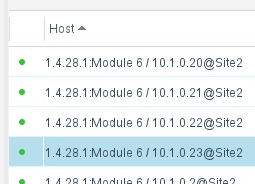
Use the IP Reuse Domain host property to create policies and Inventory views to manage endpoints in overlapping sites.
To configure this feature in the Operational Technology Plugin, see Map IP Reuse Domains to Command Center.
For further information about this implementation, see IP Reuse Domains Mapping Implementation End-to-End Configuration.
Automatic Overlapping IP Addresses
The Automatic Overlapping IP Addresses option is available as an alternative to Mapping IP Reuse Domains to the Command Center when mapping a specific IP Reuse Domain to a specific Appliance is not required, so that automatic load balancing can be applied.
To configure this feature in the Operational Technology Plugin, see Use Automatic Overlapping IP Addresses.
For further information about this implementation, see IP Reuse Domains Mapping Implementation End-to-End Configuration.
Nested Devices
In Operational Technology and automation environments a controller or other endpoint may integrate sub-modules or PLCs. High level management systems or DCS/SCADA servers communicate only with the main controller, which then mediates the communication to the secondary nested controllers.
eyeInspect components identify these child devices based on deep analysis of traffic from the parent. In the Console screen shown below, the IP address exposed by the parent device is 1.4.32.67. Sub-modules are identified by strings appended to the parent IP address. The format of these strings varies with the configuration and internal protocol of the nested device.
Use the following host properties to work with this information.
| Nested Device ID | The full string used to identify a sub-module or nested device, including the parent IP address. |
| Nested Device Parent IP | The IP address of an endpoint that contains sub-modules or nested devices. |
The Operational Technology module provides an Inventory view that lists nested devices.
Work with Endpoint Information
The Operational Technology Plugin periodically retrieves information about endpoints from the Command Center and applies an aging filter to identify active endpoints with recently reported data. By default, this filter matches the three-day limit used in Forescout to filter inactive endpoints.
The module provides reported information as endpoint properties.
- Use these properties to create conditions in Forescout policies.
- The module provides predefined Inventory views based on key properties.
In addition, information about OT endpoint function, vendor, and model is used to resolve general Forescout endpoint classification properties.
The following properties are available in the Policy editor under .
| OT Model | Indicates the model number of the OT endpoint. | |||
| OT Manufacturer | Indicates the manufacturer of the OT endpoint. | |||
| OT Labels | Indicates any labels assigned by the OT Sensor to this asset. Use of this property requires proper configuration of the Operational Technology Module. | |||
| Host MAC Addresses | Indicates any host mac addresses assigned by the OT Sensor to this asset. Use of this property requires proper configuration of the Operational Technology Module. | |||
| Device ID | ID of the device. | |||
| OT Operating System Version | Indicates the operating system version of this asset. | |||
| OT Role | Indicates the primary role or function the asset performs. The Function, Operating System and Vendor & Model properties should be used to determine the classification of this asset. | |||
| OT Originating Command Center Device | The IP of the Command Center from which we received this asset information. | |||
| Client Protocols | The application-level communications protocols used by an OT endpoint to initiate a communications stream. | From the Command Center API field: Host>client_protos | ||
| OT Communication First Seen | The ISO-formatted timestamp of when an OT endpoint was first seen by a Sensor. For example:2017-07-26T15:07:37.000+01:00 | From the Command Center API field: Host>first_seen | ||
| OT Communication Last Seen | The ISO-formatted timestamp of when an OT endpoint was last seen by a Sensor, as calculated by the Command Center. For example: 2017-07-26T15:07:37.000+01:00 | From the Command Center API field: Host>last_seen | ||
| OT Criticality | A measure of how critical (important) an OT endpoint is, based on its role. | There is a parallel Track Changes property. | From the Command Center API field: Host>criticality | |
| OT Security Risk | A measure of the current security risk of an OT endpoint, based on existing vulnerabilities, alerts and other properties of the endpoint. The value ranges from 0 to 10. | From the Command Center API field: Host>security_risk | ||
| OT Operational Risk | A measure of the current operational risk of an OT endpoint, based on existing alerts and other properties of the endpoint. | The value ranges from 0 to 10. | From the Command Center API field: Host>operational_risk | |
| OT Firmware Version | The firmware version running on an OT endpoint. | From the Command Center API field: Host>firmware_version | There is a parallel Track Changes property. | |
| OT Hardware Version | The hardware version of an OT endpoint. | From the Command Center API field: Host>hardware_version | ||
| OT Host Name | The name of an OT endpoint. | From the Command Center API field: Host>main_name | ||
| OT Modules | Information about modules detected in an OT endpoint, by rack slot. | From the Command Center API field: Host>module_identities | Refer to the eyeInspect API guide for details of the ModuleIdentity data structure used to report this value. | |
| OT NERC CIP Classification | NERC CIP classifications assigned to an endpoint. | A parallel Inventory view is provided. | From the Command Center API field: Host>nerc_cip_classifications | Refer to the eyeInspect API guide for details of the NERCCIPClassification data structure used to report this value. |
| OT Project Name | The project of a PLC endpoint. | From the Command Center API field: Host>project | ||
| OT Purdue Level | The Purdue level of an OT endpoint. Valid values include:
|
There is a parallel Track Changes property. | From the Command Center API field: Host>purdue_level | |
| OT Serial Number | The serial number of an OT endpoint. | From the Command Center API field: Host>serial_number | ||
| OT Vulnerabilities | Vulnerabilities that were detected on an OT endpoint. The database includes known CVEs and detailed CVSS information. | From the Command Center API field: Host>cves | There is a parallel Track Changes property. | Refer to the eyeInspect API guide for details of the HostCVEInfo data structure used to report this value. |
| Server Protocols | The application-level communications protocols accepted by an OT endpoint to establish a communications stream. | From the Command Center API field: Host>server_protos | ||
| OT Sensor Names | These are the unique Names of the sensors that have seen this host. | |||
| OT Sensor Name | This is the name of the first sensor (from a list of sensors) that detected the endpoint. | The format is <sensor name>@<command center host name/IP> | ||
| OT IP Reuse Domain | This is the name of an IP Reuse Domain from the Command Center. It appears only for endpoints that were detected by the Operational Technology Module when the Automatic Overlapping IP Addresses feature is enabled. | The property value is the IP Reuse Domain name that was configured in the Command Center, not the IP Reuse Domain Internal id. | ||
| OT Vulnerability ID | ID of a vulnerability detected on an OT endpoint. | The database includes known CVEs and detailed CVSS information. | From the Command Center API field: Host>cves | |
 minute read