About the Passive Sensor Plugin
Passive Sensors are monitoring sensors, hosted on Appliances. The Passive Sensor Plugin described in this guide is optionally used in conjunction with the Operational Technology plugin as part of the eyeSight-eyeInspect integration. See the Operational Technology Plugin Guide for more information.
Supported Versions and Components
This is the compatibility matrix for the Passive Sensor Plugin within the eyeSight-eyeInspect integration.
| eyeSight Version | Operational Technology Plugin Version | Passive Sensor Plugin Version | eyeInspect Command Center Version |
|---|---|---|---|
| 9.1.6 | 3.2.1 | 7.0.1 | 5.11 |
| 9.1.3, 9.1.5 | 3.1.0 | 7.0.0, 7.0.1 | 5.5.x, 5.9.x |
| 8.5.x | 3.1.0 | 6.0.1 | 5.11 |
| 8.5.x | 3.1.0 | 6.0.0 | 5.5.x, 5.9.x |
eyeSight-eyeInspect Integration Components
The eyeSight-eyeInspect integration comprises the following components:
| Component | Description |
|---|---|
|
eyeInspect Passive Sensor and Passive Sensor Plugin |
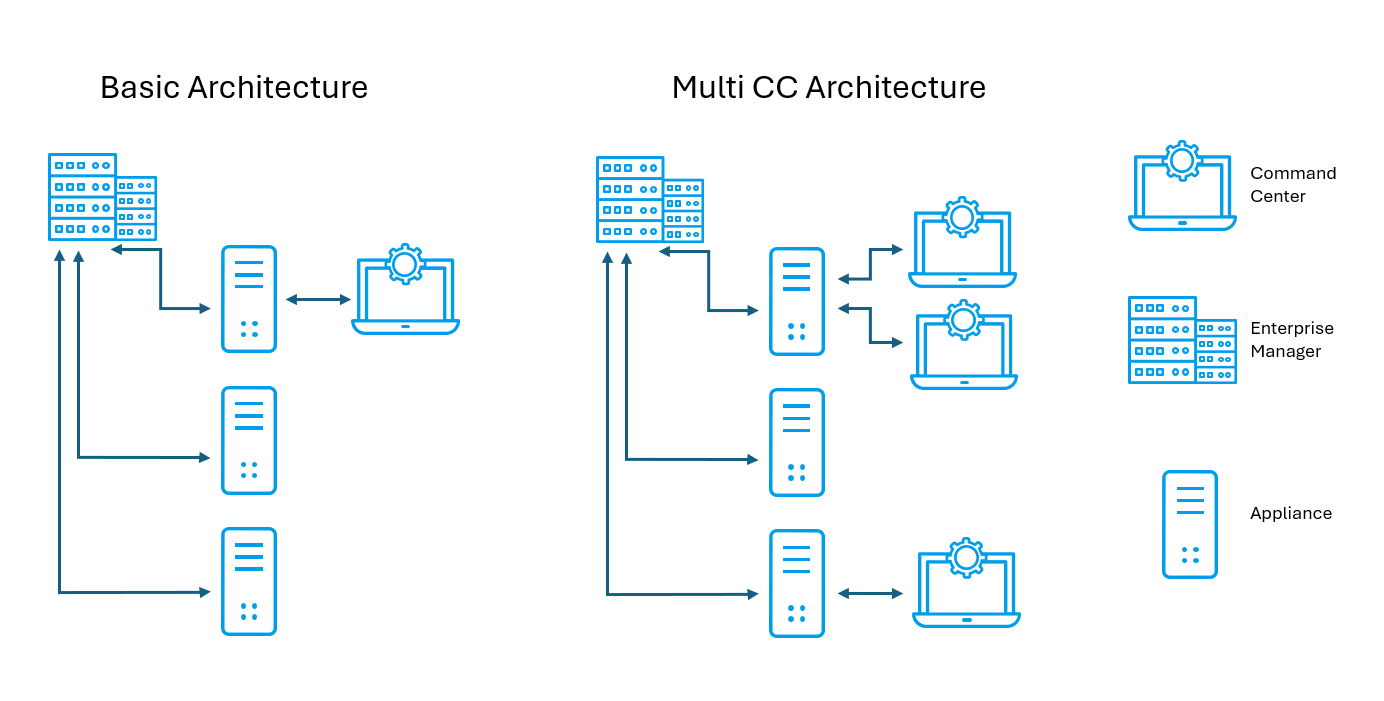
Each Passive Sensor is connected to the ICS/SCADA (Industrial Control Systems/Supervisory Control and Data Acquisition) network via one or more SPAN/mirroring ports to passively audit the network traffic and detect malicious activities. The detection methods used by Passive Sensors are packaged in modules that can be selectively enabled. A dedicated monitoring interface sends events and logs from the Passive Sensor to the Command Center. |
|
eyeInspect Command Center |
Each Command Center collects and processes data reported by one or more Sensors, and supports a web interface for endpoint event management. |
|
Operational Technology Plugin |
The Operational Technology Plugin connects to Command Center instances to integrate events and information collected from monitored endpoints. This information is made available for use in Forescout policies and by endpoint management tools. |
|
Content Modules provide regularly updated information to enhance detection and handling of Operational Technology endpoints |
The Operational Technology Vulnerability Database provides periodic updates of the vulnerabilities that Command Center can detect on endpoints, based on published CVEs and advisories. The Traffic Inspection Library adds protocol parsing capabilities to the Forescout platform. The library provides scripts that enhance traffic inspection by the Operational Technology module and associated eyeInspect components. The library is updated periodically to improve the breadth and precision of inspection. |
Representations of the basic eyeSight-eyeInspect architecture (single eyeInspect Command Center) and multi Command Center architecture are shown below.
eyeSight License for eyeInspect and (full) eyeInspect License
Customers require eyeInspect licenses to work with the eyeSight-eyeInspect integration.
eyeSight Access to eyeInspect functionality depends on which type of license the customer uses.
There are two license levels for eyeInspect Command Centers:
- The eyeSight License for eyeInspect provides a reduced
set of functionalities for the eyeInspect Command Center. Support is limited to
asset inventory and vulnerabilities via the Operational Technology Plugin, and
fully supports Passive Sensors through the Passive Sensor Plugin. The customer
has access to the Sensors and Settings tabs on the Command Center UI, but cannot
view any endpoint data via Dashboards, Events, and Network tabs, which are
disabled.
All eyeSight customers are entitled to this license, and there is no additional licensing cost, provided that the customer has sufficient endpoint coverage for the new endpoints discovered by eyeInspect.
- The (full) eyeInspect License grants complete access to
all eyeInspect functionality and UI tabs, and supports Passive Sensors. Note: Both the eyeSight License for eyeInspect and the (full) eyeInspect License are installed on Command Centers.
For more information, see the Forescout OT Hardware Guidelines.
eyeSight-eyeInspect Certificates
The eyeInspect default certificate is used as the unique certificate for the Passive Sensor Plugin.
When you are changing certificates for existing Command Center connections in the Passive Sensor plugin, it is necessary to import eyeInspect certificates into eyeSight. This ensures communication is established between eyeInspect Command Center and the Passive Sensor plugin.
To do this:
-
Replace the certificates in the Command Center and Passive Sensor plugin
While following the steps in the above page, keep the following in mind for the passive sensor plugin:
- For the sensor path, use /usr/local/forescout/plugin/otsensor/nids/cert/ instead of /opt/nids/cert.
- To restart the passive sensor plugin, use the command fstool otsensor restart instead of supervisorctl restart nids.
- Do not use supervisorctl commands for the passive sensor plugin.
-
Export the eyeInspect certificates and then import them into eyesight (scroll down to the section eyeSight-eyeInspect Certificates)
 minute read