Legitimate traffic
Forescout provides a set of options for handling legitimate traffic in your network.
About handling legitimate activity from malicious sources
You can define rules for allowing specific kinds of probes at your network. This type of activity is referred to as legitimate traffic activity. Once these rules are defined, endpoints that perform Legitimate Traffic are ignored. Specifically, they are not counted in the probe count by Forescout eyeControl when attempting to probe defined services or host.
By default, the Legitimate Traffic rule is set to ignore NetBIOS and port probes by any source to any real host on any service. This allows eyeControl to ignore legitimate network activity and handle activity on virtual endpoints that it creates.
You should keep the default settings, and then use the Legitimate Traffic tools to add other Legitimate Traffic rules, as required. For example, if you are performing vulnerability assessments from specific addresses on specific ports, or for a printer that is required to scan the network to find a server to connect to, or any other business requirement that compels you to grant full access to specific addresses.
Centralized Management
Legitimate Traffic rules can be centrally managed via the Enterprise Manager for all connected Appliances. This means the rules defined in the Enterprise Manager are applied to all Appliances. Centralized management ensures consistency in Legitimate Traffic probe definitions across your enterprise. This eliminates the process of redefining the rules at each Appliance, making it easier to conclude deployment.
When registering an Appliance to the Enterprise Manager, all legitimate traffic rules configured on that Appliance are replaced by the rules on the Enterprise Manager.
Centralized Management
Legitimate Traffic rules can be centrally managed via the Enterprise Manager for all connected Appliances. This means the rules defined in the Enterprise Manager are applied to all Appliances. Centralized management ensures consistency in Legitimate Traffic probe definitions across your enterprise. This eliminates the process of redefining the rules at each Appliance, making it easier to conclude deployment.
When registering an Appliance to the Enterprise Manager, all legitimate traffic rules configured on that Appliance are replaced by the rules on the Enterprise Manager.
Activity at Other Services
If a legitimate source probes the legitimate endpoints and ports assigned to it, and does not probe any other ports or endpoints, that source is not marked as a probing source, and thus is not a candidate for monitoring and blocking. If the same source also probes at least three endpoints or ports not marked as legitimate within the defined time period, a mark is distributed to the source. If the source uses the mark, it is considered an infected source and as such is a candidate for monitoring and blocking.
After a source is detected as offensive, its attempts to access the legitimate endpoints and ports assigned to it are blocked and monitored.
Centralized Management
Legitimate Traffic rules can be centrally managed via the Enterprise Manager for all connected Appliances. This means the rules defined in the Enterprise Manager are applied to all Appliances. Centralized management ensures consistency in Legitimate Traffic probe definitions across your enterprise. This eliminates the process of redefining the rules at each Appliance, making it easier to conclude deployment.
When registering an Appliance to the Enterprise Manager, all legitimate traffic rules configured on that Appliance are replaced by the rules on the Enterprise Manager.
View legitimate traffic
Legitimate Traffic is defined and managed from the Legitimate Traffic dialog box. From the dialog box, you can add, edit, and remove rules, as well as to filter information about the rules that you have already defined. A feature is also available to import and export Legitimate Traffic rules.
To view the legitimate traffic list, select , and then select .
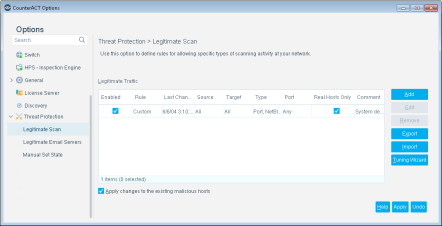
The following information is available:
 minute read