Forescout eyeSight policy main rule advanced options
Right-click a Main Rule in the Policy Manager, and then select Quick Edit > Advanced.
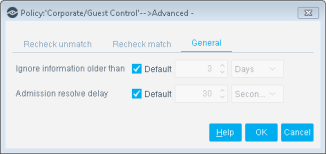
Update a Policy Recheck for Unmatched and Matched Endpoints
By default, both matched endpoints and unmatched endpoints are rechecked every eight hours, and on any admission event. An admission event is a network event that indicates the admission of an endpoint into the network, such as when it physically connects to a switch port. A complete list of admission events is described below.
Recheck tools let you define:
- How often endpoints that match a policy are rechecked
- Under what conditions to perform recheck
You can update the default setting for matched and unmatched hosts, for example, to initiate inspection according to a set schedule. You can also configure several recheck settings to work simultaneously, for example, when a host IP address changes every five hours.
Separate settings can be defined for hosts that either match or do not match a policy.
To define rule recheck settings:
- Right-click a Main Rule from the Policy Manager, and then select Quick Edit > Advanced.
- Select the Recheck unmatch or Recheck match tab.
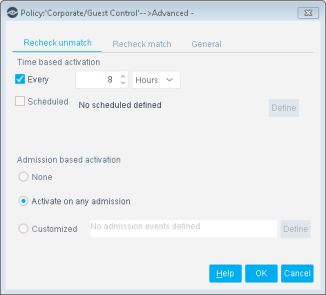
Update a Policy Recheck for Unmatched and Matched Endpoints
By default, both matched endpoints and unmatched endpoints are rechecked every eight hours, and on any admission event. An admission event is a network event that indicates the admission of an endpoint into the network, such as when it physically connects to a switch port. A complete list of admission events is described below.
Recheck tools let you define:
- How often endpoints that match a policy are rechecked
- Under what conditions to perform recheck
You can update the default setting for matched and unmatched hosts, for example, to initiate inspection according to a set schedule. You can also configure several recheck settings to work simultaneously, for example, when a host IP address changes every five hours.
Separate settings can be defined for hosts that either match or do not match a policy.
To define rule recheck settings:
- Right-click a Main Rule from the Policy Manager, and then select Quick Edit > Advanced.
- Select the Recheck unmatch or Recheck match tab.
Admission-Based Activation
The following options are available:
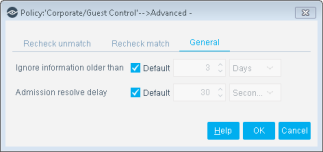
Handle Forescout eyeSight policy dated information - General tab
To define how dated information is handled, right-click a rule from the Policy Manager, and then select , and then select the General tab.
Set and Increment Forescout eyeSight policy counters
This topic describes properties and actions to set and evaluate counters in policies. Policies can trigger actions based on counters assigned and incremented previously by other policies. This lets you use endpoint history in policies.
For example, if an endpoint repeatedly installs pluggable memory devices, you can initiate actions on the endpoint after this behavior is repeated several times. Use counters to take into account hot-swap memory, and identify problematic repeat users.
When using counters in policies:
- Counters are incremented when:
- The endpoint meets the conditions of the policy, and the counter is initialized.
- Host properties change. The policy examines the endpoint and finds that it no longer satisfies the policy.
- Host properties change again. The policy examines the endpoint again and finds that it satisfies the policy. The counter is incremented.
This is how Forescout eyeSight evaluates other policy conditions. However, counter values are retained even when the endpoint no longer satisfies the conditions of the policy.
Note: Counters are maintained per endpoint. The same counter can have a different value for each endpoint.Use properties and actions related to counters as follows:
- When you create a policy rule that defines a new counter, use only the Set Counter action.
- A policy rule that increments an existing counter must use both the Counter property and the Set Counter action:
- The rule contains a condition that uses the Counter property to verify the presence of the counter for an endpoint. Enable the Evaluate irresolvable criteria as True option when the Counter property is used to verify the presence of a new counter.
- Then the rule uses the Set Counter action to increment the counter on endpoints that match the condition.
 minute read