Start Windows updates
The Start Windows Updates action uses the standard Microsoft system for vulnerability remediation. It causes Microsoft software to assess the endpoint's vulnerabilities, decide which patches are required, and download and install the patches.
This action removes the need to manage the vulnerabilities of new endpoints before they connect to the network. It can automatically bring all new endpoints into vulnerability compliance when they connect to the network and keep them compliant.
You can also minimize bandwidth usage during Microsoft vulnerability patch download. See Minimize Bandwidth Usage During Microsoft Vulnerability Patch Download.
Use this action in policies that have incorporated the Windows Security > Microsoft Vulnerabilities property and the Windows Security > Windows Update Agent Installed property.
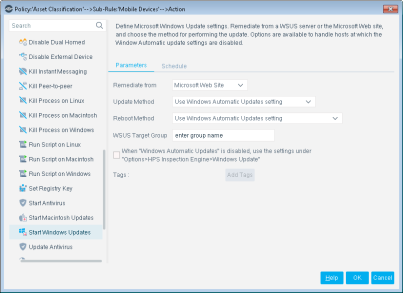
To work with this feature, you must define:
- A remediation server to work with
- An update method
Remediation Server
Microsoft remediation can be done via the Microsoft website or via a Microsoft WSUS server.
Microsoft Website
Remediation via the website requires connectivity to the Internet. For more information about these methods, refer to the Microsoft website.
WSUS Server
Remediation via WSUS requires connectivity to the WSUS server. You can also enter a WSUS Target Group name. This enhances update performance.
When using WSUS, consider the following:
- In addition to setting up the WSUS server, you must define the WSUS environment parameters in the HPS Inspection Engine (see below).
- When the Start Windows Updates action is performed on an endpoint, the WSUS parameters are permanently defined in the endpoint registry.
- You can clear the Apply WSUS settings parameter to avoid having the WSUS parameters defined in the endpoint registry. If you do this, be aware that if the endpoint’s WSUS settings are not defined correctly, the endpoint will not be remediated.
To define WSUS environment parameters:
- Select .
- Select the Windows Update tab.
- Enter the URL of the WSUS server and the reports server.
You can test connection with the server by selecting Test.
- Select Apply and then select Close.
Remediation Server
Microsoft remediation can be done via the Microsoft website or via a Microsoft WSUS server.
Microsoft Website
Remediation via the website requires connectivity to the Internet. For more information about these methods, refer to the Microsoft website.
WSUS Server
Remediation via WSUS requires connectivity to the WSUS server. You can also enter a WSUS Target Group name. This enhances update performance.
When using WSUS, consider the following:
- In addition to setting up the WSUS server, you must define the WSUS environment parameters in the HPS Inspection Engine (see below).
- When the Start Windows Updates action is performed on an endpoint, the WSUS parameters are permanently defined in the endpoint registry.
- You can clear the Apply WSUS settings parameter to avoid having the WSUS parameters defined in the endpoint registry. If you do this, be aware that if the endpoint’s WSUS settings are not defined correctly, the endpoint will not be remediated.
To define WSUS environment parameters:
- Select .
- Select the Windows Update tab.
- Enter the URL of the WSUS server and the reports server.
You can test connection with the server by selecting Test.
- Select Apply and then select Close.
Remediation Server
Microsoft remediation can be done via the Microsoft website or via a Microsoft WSUS server.
Microsoft Website
Remediation via the website requires connectivity to the Internet. For more information about these methods, refer to the Microsoft website.
WSUS Server
Remediation via WSUS requires connectivity to the WSUS server. You can also enter a WSUS Target Group name. This enhances update performance.
When using WSUS, consider the following:
- In addition to setting up the WSUS server, you must define the WSUS environment parameters in the HPS Inspection Engine (see below).
- When the Start Windows Updates action is performed on an endpoint, the WSUS parameters are permanently defined in the endpoint registry.
- You can clear the Apply WSUS settings parameter to avoid having the WSUS parameters defined in the endpoint registry. If you do this, be aware that if the endpoint’s WSUS settings are not defined correctly, the endpoint will not be remediated.
To define WSUS environment parameters:
- Select .
- Select the Windows Update tab.
- Enter the URL of the WSUS server and the reports server.
You can test connection with the server by selecting Test.
- Select Apply and then select Close.
Remediation Server
Microsoft remediation can be done via the Microsoft website or via a Microsoft WSUS server.
Microsoft Website
Remediation via the website requires connectivity to the Internet. For more information about these methods, refer to the Microsoft website.
WSUS Server
Remediation via WSUS requires connectivity to the WSUS server. You can also enter a WSUS Target Group name. This enhances update performance.
When using WSUS, consider the following:
- In addition to setting up the WSUS server, you must define the WSUS environment parameters in the HPS Inspection Engine (see below).
- When the Start Windows Updates action is performed on an endpoint, the WSUS parameters are permanently defined in the endpoint registry.
- You can clear the Apply WSUS settings parameter to avoid having the WSUS parameters defined in the endpoint registry. If you do this, be aware that if the endpoint’s WSUS settings are not defined correctly, the endpoint will not be remediated.
To define WSUS environment parameters:
- Select .
- Select the Windows Update tab.
- Enter the URL of the WSUS server and the reports server.
You can test connection with the server by selecting Test.
- Select Apply and then select Close.
Remediation Server
Microsoft remediation can be done via the Microsoft website or via a Microsoft WSUS server.
Microsoft Website
Remediation via the website requires connectivity to the Internet. For more information about these methods, refer to the Microsoft website.
WSUS Server
Remediation via WSUS requires connectivity to the WSUS server. You can also enter a WSUS Target Group name. This enhances update performance.
When using WSUS, consider the following:
- In addition to setting up the WSUS server, you must define the WSUS environment parameters in the HPS Inspection Engine (see below).
- When the Start Windows Updates action is performed on an endpoint, the WSUS parameters are permanently defined in the endpoint registry.
- You can clear the Apply WSUS settings parameter to avoid having the WSUS parameters defined in the endpoint registry. If you do this, be aware that if the endpoint’s WSUS settings are not defined correctly, the endpoint will not be remediated.
To define WSUS environment parameters:
- Select .
- Select the Windows Update tab.
- Enter the URL of the WSUS server and the reports server.
You can test connection with the server by selecting Test.
- Select Apply and then select Close.
 minute read