Use IP Reuse Domains to Assign Overlapping IP Addresses to Appliances
Perform this procedure after you enable support for overlapping IP addresses, as described in Map IP Reuse Domains in Operational Technology Environments.
To assign overlapping IP addresses to Appliances:
- In Segment Manager, define segments that reflect repeated structures while distinguishing each instance. For example, in a simple case of branch offices:
Site A Site B Segment 192.168.0.0-Site-A Segment 192.168.0.0-Site-B Admin-Site-A (10.32.3.0) Admin-Site-B (10.32.6.0) Segments in Site A and Site B share overlapping IP addresses (192.168.0.0). Each site also has a segment without overlapping IP addresses, that should be configured as part of the default/global network.
- (Recommended) Define IP Reuse Domains before you configure overlapping areas of the Appliance tree. Select . Define an IP Reuse Domain for each overlapping site. You can also define IP Reuse Domains as you configure the Appliance tree, as described in the following steps.
- If your environment includes an eyeInspect deployment with IP Reuse Domains, plan the IP Reuse Domains in the eyeSight to correspond to the IP Reuse Domains defined in Command Center. See Map IP Reuse Domains in Operational Technology Environments.
- Select . As you work in this pane, use IP Reuse Domains to distinguish sites with overlapping IP addresses.
- Assign segments of an overlapping site to Appliance(s) or folder(s) dedicated to that site. To open the Segment Assignment dialog, do one of the following:
- Right-click a folder and select Assign Segments.
- Select an Appliance and select Assign.
Then select Select to choose segments of one overlapping site.
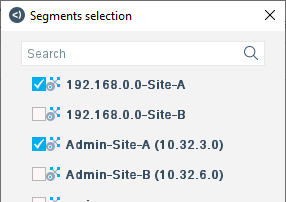
- In the IP Reuse Domain field, do one of the following:
- Select an existing IP Reuse Domain.
- Select New to create a new IP Reuse Domain.
- Select (none) to exclude this Appliance/folder from all IP Reuse Domains. This Appliance/folder is in the default/global network.
- Select (Same as Folder) to inherit this setting from parent folders. Tip: When several Appliances support an overlapping site, place the Appliance tree that handles the site under a folder. Assign an IP Reuse Domain to that top-level folder and use the Same as Folder option in child folders and Appliances.
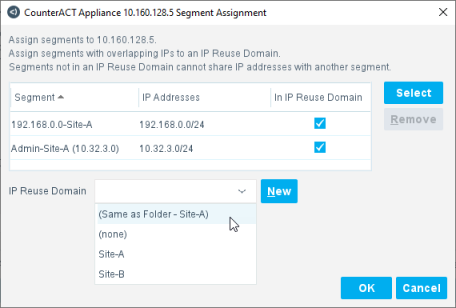
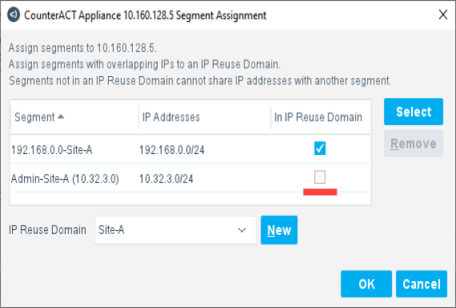
- (Optional) When an Appliance/folder is assigned to an IP Reuse Domain, you can exclude individual segments from the IP Reuse Domain. Clear the In IP Reuse Domain checkbox for a segment to place it in the default/global network.
In the example shown, segment Admin-Site-A is excluded from the IP Reuse Domain, but is still managed by an Appliance that handles Site A. This segment is in the default/global network.
 Use this method to configure Wireless controllers in overlapping sites. See Configure Switches and Controllers in IP Reuse Domains.
- Assign segments of an overlapping site to Appliance(s) or folder(s) dedicated to that site. To open the Segment Assignment dialog, do one of the following:
- If the overlapping site includes switches, Appliances in the site’s IP Reuse Domain manage the switches. See Configure Switches and Controllers.
- Repeat this procedure for the other sites. Assign overlapping sites to different Appliances, and give Appliances of each site a unique IP Reuse Domain. The IP Reuse Domain uniquely identifies each instance of an overlapping IP address.
- Areas of the network without overlap are largely unaffected when you enable support for overlapping IP addresses. Nodes of the Appliance tree that do not contain overlapping IP addresses do not require IP Reuse Domains. All these nodes form a single default/global network. IP addresses must be unique in this default/global network.
- When you enable support for overlapping IP addresses, there are limitations in Failover Cluster functionality:
- You can define failover clusters as in previous releases when folders do not include overlapping sites.
- You cannot define failover between two overlapping sites. A failover cluster cannot include Appliances in two different IP Reuse Domains.
- Similarly, a failover cluster cannot include both segments in the global/default network and segments in an IP Reuse Domain.
- Failover clusters may not work in branches of the Appliance tree that handle overlapping sites. In particular, failover does not work when you configure a failover cluster in a folder that includes both segments in the global/default network and segments in an IP Reuse Domain.
- Once you create and use IP Reuse Domains, you cannot disable support for overlapping IPs until you remove all IP Reuse Domain assignments and delete all defined IP Reuse Domains.
- Segments that include IPv6 addresses cannot be placed in IP Reuse Domains. Typically overlapping networks are supported by the larger IPv6 address space.
- Endpoints discovered based on their MAC address are not assigned to an IP Reuse Domain until their IP address is learned.
- To simplify management, it is strongly recommended to place all instances of overlapping IP addresses in IP Reuse Domains. Technically it is possible to keep a single instance of an overlapping IP address in the default/global network. This may be useful when a merge of new and existing networks causes overlap. The current network definition remains unchanged, and newly incorporated sites are assigned to one or more IP Reuse Domains.
 minute read