Devices Dashboard
Clicking the Dashboards menu and selecting Devices from the dropdown displays the Devices Dashboard.
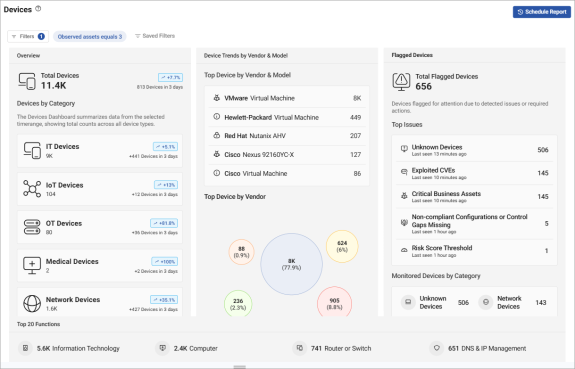
The Devices Dashboard provides total counts of all device types, and top 10 and total count breakdowns on Device Functions, Operating Systems, and Vendors. At the top of the display for the Devices Dashboard, trend arrows indicate the percentage change over the selected time period for each Device category.
Use the Filters button to refine displayed data to your preferences. For information on filters, see Filters in the Assets topic.
You can click on specific data shown in a widget to drill immediately to the Asset data that populated it.
Unknown Device Trend Data: Data related to devices classified as "Unknown" is not included here. To create a custom widget showing trend data for Devices classified as "Unknown", see Create a custom dashboard. In step 4 of the procedure, select "Add Existing Visualization". In step 5 of the procedure, populate the widget with data from Devices Classification Over Time under Devices Dashboard.
Devices by Category
The widgets at the top of the Devices Dashboard summarize your network devices by the following categories:
- Total Devices
- IT Devices
- IoT Devices
- OT Devices
- Medical Devices
- Network Devices
 minute read