Health monitoring
Use to gain deployment-level insight into eyeSight appliance health using the Health Monitor and Alert Center.
Clicking Health from the main menu allows you to select between eyeSight Health Monitor and eyeSight Alert Center. From these views, you can monitor the health of various device deployments.
Health monitor
The Health Monitor view provides you with an overview of important deployment-level Appliance health information.
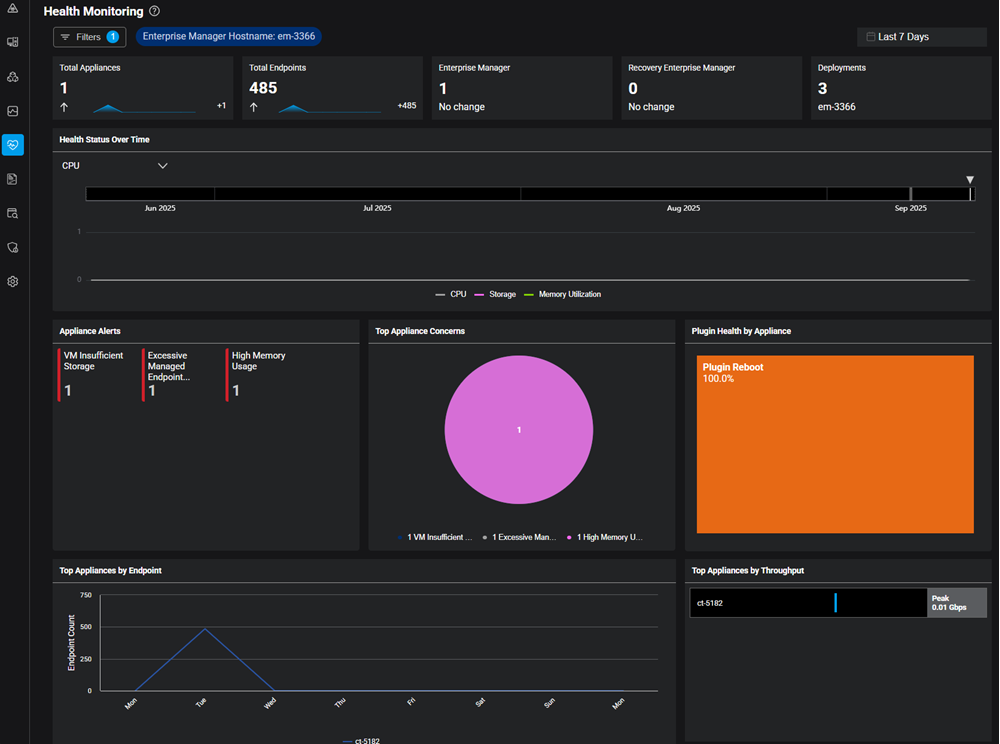
Click a specific widget to open a new window that shows the filtered source information for displayed data. From here, you can drill to the specific details view of the affected appliance to gain additional insight.
Click Filters to select the eyeSight hostname (deployment) you want to monitor.
Use the Time Range dropdown to specify the period you want information about.
At the top of the screen, summary widgets provide a count and trend indicators for the following eyeSight elements:
- Total Appliances
- Total Endpoints
- Enterprise Manager
- Recovery Enterprise Manager
The Appliances Reboots timeline shows factors affecting appliance availability over time by the following elements:
- Appliances Reboots
- CPU
- Storage
- Plugin Reboots
- Memory Utilization
Appliance Alerts displays a count of key Alerts related to the health of your Appliances, including the following:
- Suboptimal Policy Efficiency Appliances
- High Admission Event
- Excessive http Login Rate
- High Disk Latency Virtual
- High Resolve Request Rate
- High Property Value Change Event
- Noncompliant Appliances
- Excessive 8021x Authentication Rate
- Delayed Requests
- Plugin Requests Delayed
- Stalled Plugins
- High CPU Usage
- High Packet Loss
Clicking an Appliance Alert displays expanded details about the alert, including the specific affected appliances and associated concerns. Use the Concerns dropdown to displays the appliances associated with the Concern type.
For metrics related to SWITCH, RADIUS and CDE plugins, use the Custom Dashboards feature and select from the Health Monitoring drop down. For more information, see Create a custom dashboard.
Top Appliance Concerns : Shows the most prevalent Appliance Alerts.
Top Appliances by Endpoint: Shows a count of Appliances over time sorted by specific endpoint.
Plugin Health by Appliance: Shows plugin Health incidents organized by Plugin Reboot, Plugin Stalled, Delayed Request, and Dropped Request.
Top Appliances by Throughput: Shows the appliances with the highest bandwidth utilization.
 minute read