Reports
Clicking Reports on the main menu displays the Unified Reporting view.
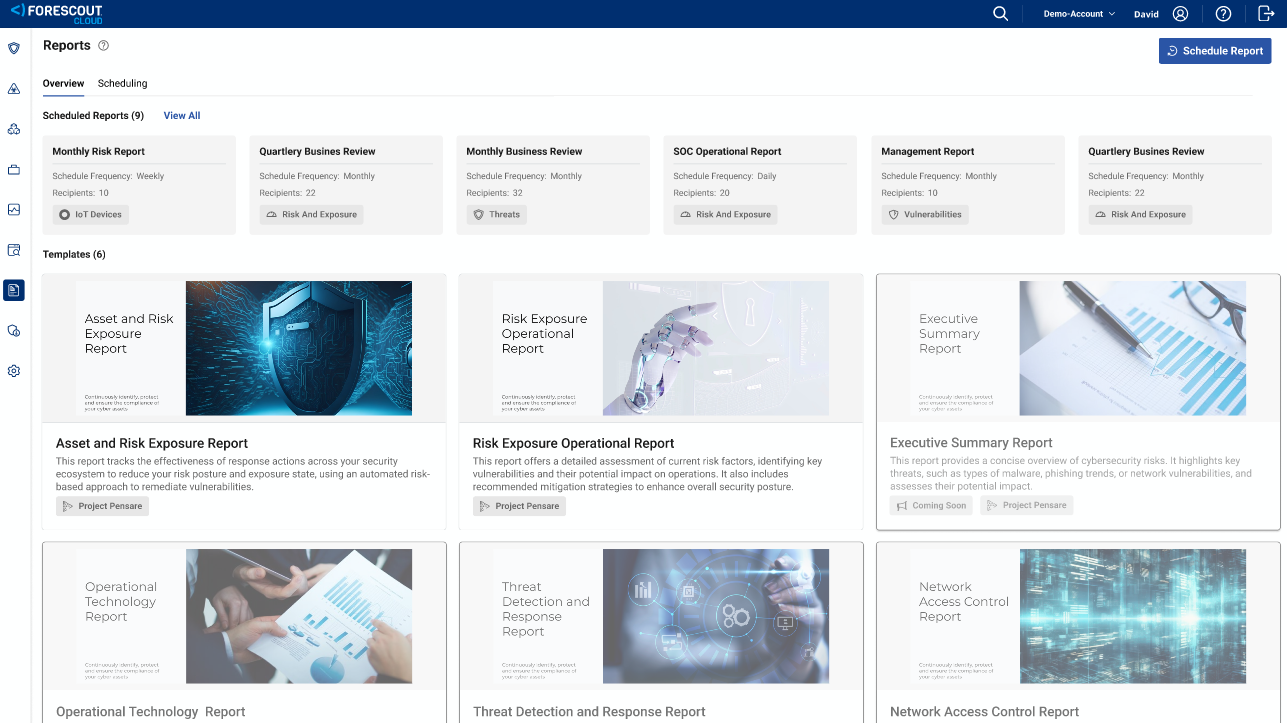
Here you can select from a list of AI-generated narrative reports that provide both industry-wide and account-specific analysis of a critical topic of interest. Here you can also see any dashboard reports that you have scheduled.
For specific guidance, see How to build and schedule a narrative report.
currently supports the following four narrative reports, which are shown on the Overview tab:
-
Asset and Risk Exposure Report: This report measures the effectiveness of response actions across your security ecosystem to reduce your risk posture and exposure state, using an automated risk-based approach to remediate vulnerabilities.
-
Risk Exposure Operational Report: This report is dynamically generated based on operational data from your tenant, and is intended for an audience that regularly uses Forescout . It highlights the biggest threats and highest sources of risk in your environment, recommends actions to mitigate, and details the effectiveness of actions you have already taken.
- Essential 8 Compliance Report:
The Essential Eight Compliance Reporting Initiative aims to implement a comprehensive reporting system that assesses and visualizes the effectiveness of the Essential Eight (E8) mitigation strategies developed by the Australian Signals Directorate (ASD). This initiative will enable organizations to monitor their cybersecurity posture effectively, identify gaps in compliance, and ensure adherence to established guidelines.
The Essential 8 Compliance Report provides a comprehensive overview of your organization's alignment with this Australian cybersecurity framework. It assesses maturity levels across the following 8 key areas:
- IT Devices + Windows
- IT Devices + macOS
- IT Devices + Linux
- IT Devices + Mobile Devices
- IoT Devices
- OT Devices
- Medical Devices
- Network DevicesNote: To view medical device and operational technology (OT) properties, your account administrator must enable the Medical Device Information and OT Device Capabilities features. For more information, see Account settings.
-
Compliance and Control Report: This report tracks the effectiveness of response actions across your security ecosystem to reduce your risk posture and exposure state using an automated, risk-based approach to remediate vulnerabilities.
Scheduled reports
On the Overview tab, the widgets under Scheduled Reports summarize the scheduled Narrative and Dashboard reports that you have configured. They show the report title, frequency, number of recipients and focus of the report.
Clicking View All or the Scheduling tab displays the full list of scheduled reports. Here you can view and modify the content and scheduling details of your various reports.
 minute read