Work with Forescout Groups
A group is a collection of endpoints with something in common, for example, endpoints that run Windows operating systems or guest endpoints. Groups help you view and manage detections.
After you define groups and add endpoints to them, you can use the groups when specifying the scope of a policy. For example, if you create a Windows group, this definition is available when defining the scope or condition of a policy.
Groups are displayed in the Filters section of the Navigation pane.
The Console provides some default groups. For example, classification and corporate/guest groups may have been automatically created when your Console was set up. See Initial Setup Wizard - Policies for details. In addition, optional plugins and policy templates may create groups.
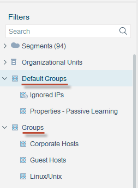
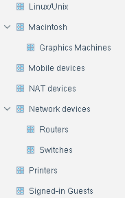
Groups exist in a hierarchy, with sub-groups inside parent groups. All endpoints in the sub-groups are included in the parent group.
To add endpoints to a group:
- Specify the MAC or IP addresses in Group Manager.
- Use the Add to Group action in a policy, or apply it from the Console's right-click menu.
When a group is used, for example, when a policy is evaluated that uses the group in its Scope definition, endpoints that currently have addresses in these ranges or lists are included in the group. Endpoints may not be included in the group later if their IP addresses change.
The Audit Trail reports provide information about users who have modified group definitions.
Not all users have access to the Group features. See Access to Console Tools - On-premises Permissions for details.
 minute read