Forescout eyeSight Failover Clustering
Forescout eyeSight deployments (e.g., centralized or hybrid) require resiliency within and across sites and geographic locations. Each site (e.g., data center) can contain many Appliances. Failover Clustering provides a resiliency solution in the event that an Appliance, a number of Appliances or an entire site fails. This means that the workload handled by the failed Appliance/s will automatically be transferred to other functioning Appliances with free capacity.
Failover clustering enhances reliability by ensuring that you can:
- Withstand either single or multiple points of failure in the event of resource failure, for example, in case of a power outage.
- Maintain Forescout service continuity with no need for manual intervention.
The Failover Clustering solution offers a deployment architecture that uses fewer idle standby resources, resulting in reduced cost, complexity, and power consumption. Additionally, in the event of an Appliance failure, the workload is balanced among Appliances so as to avoid overloading the recipient Appliances.
Forescout eyeSight failover clusters
A failover cluster defines a group of geographically/logically connected Appliances, such as those at a data center. A failover cluster is the basic unit of failover. Appliances within a failover cluster that fail, can fail over to other Appliances in the cluster. For example, if you create failover cluster New York, an Appliance within the cluster that fails can fail over to the other Appliances in the cluster.
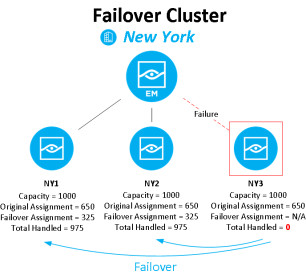
About Forescout eyeSight failover and failback
Failover occurs after an Appliance fails, and the range of endpoints and network devices handled by the Appliance is distributed to one or more recipient Appliances for continued handling. A recipient Appliance is a functioning Appliance managed by the same Enterprise Manager as the failed Appliance. The range of transferred endpoints and network devices is the Failover Assignment, which will now be handled by the recipient Appliance in addition to the Original Assignment, which is the range of endpoints and network devices originally configured for the recipient Appliance.
eyeSight eyeRecover considers an Appliance failed when attempts by the Enterprise Manager to connect to it through port 13000 result in connection time outs for a defined period. This means that the Enterprise Manager cannot connect to the Appliance at the operating system level for this period of time. This may occur for a variety of reasons, for example, if the Appliance is unplugged or in the event of a natural disaster. See Configure Failover for more information about the failover detection time period.
If the Forescout service is down on the Appliance, for example, during an upgrade, the Appliance is not considered failed and failover will not occur, even if the service is down for longer than the detection time period.
Forescout eyeSight continuity of endpoint, switch and wireless device visibility
When transferred to a recipient Appliance, endpoints (both wired and wireless) and switch and wireless devices continue to be visible in the Forescout Console and most previously discovered data is preserved. Properties resolved on endpoints, and actions previously performed on endpoints by the original Appliance are transferred with the endpoints and will continue to apply.
In addition, endpoints are rechecked for policy evaluation after being transferred to the recipient Appliance. This ensures that endpoint information is preserved, and that enforcement continues functioning as in a regular, non-failover scenario.
Data transferred with the endpoint includes:
- Matched policies and sub-rules
- Manual continuous actions applied on the endpoint and information relevant to them
- Events and properties that cannot be relearned and are used in policies
Note: The Authentication Signed In Status property is not transferred.Note: There might be occurrences in which an applied, switch restrict action is temporarily canceled by the Switch Plugin. However, as soon as Forescout eyeRecover re-discovers and re-evaluates the affected endpoints, the Switch Plugin re-applies the action that was in effect on the endpoints, as necessary.
Continuity of visibility, information, and enforcement is not currently available for:
- Endpoints connecting via VPN
- Forescout extended modules
Forescout eyeSight Switch plugin auto-discovery
During a failover scenario, the Switch Plugin auto-discovery feature is affected as follows:
- Managed Switch Failover to a Recipient Appliance. All neighboring switch devices that the Switch Plugin, on the recipient Appliance, learns about from the auto-discovery efforts of a failed-over managed switch device remain managed by the Switch Plugin on the recipient Appliance.
- Managed Switch Failback to the Original Appliance. When failback occurs, only the failed-over managed switch device is re-assigned back to the original Appliance.
Forescout eyeSight failover scope
In addition to supporting failover within a single failover cluster, you can configure a failover scope for a cluster, consisting of multiple clusters, to allow failover across clusters. This allows distribution of endpoint, and switch and wireless device assignments to a wider range of Appliances in the case of Appliance failure and allows you to protect and back up an entire site to other sites in a different geographic location.
When an Appliance fails, its handled endpoints and network devices are first distributed to other Appliances that have free capacity within the same failover cluster. When no Appliances in the cluster have free capacity, assignments are distributed to Appliances in other clusters in the failover scope.
For example, you can add failover cluster New Jersey to the failover scope of the New York cluster. The scope will consist of both New Jersey and New York. If an Appliance from New York fails, its handled assignments are distributed across Appliances from New York and New Jersey, with a preference to local, intra-cluster Appliances from New York. If the entire New York site fails, its assignments are distributed across Appliances from New Jersey.
When a failover occurs, the endpoint capacity of the recipient Appliance/s may be exceeded. See Handling Endpoints that Exceed Capacity for more information.
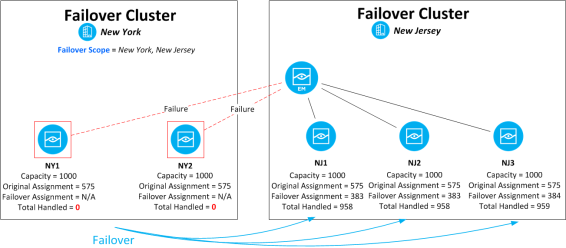
A single cluster can be in the scope of more than one other cluster. Scope definitions are per-cluster and are not bidirectional. So, for example, adding the failover cluster New Jersey to the failover scope of the New York cluster does not automatically add New York to the scope of the New Jersey cluster.
See Configure Failover for information about configuring failover clusters.
Forescout eyeSight failover cluster folder type
A failover cluster  folder type in the CounterACT Devices > IP Assignment and Failover pane allows users to configure failover.
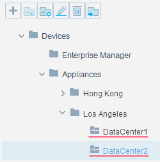
Failover clusters integrate with the existing Appliance folders feature, which lets you organize your network Appliances into logical groups in a tree structure, helping you to create a visual representation of your network Appliance deployment. Refer to Working with Appliance Foldersin the Forescout eyeSight Administration Guide for information about organizing Appliances using Appliance folders.
Forescout eyeSight system backup
Performing a system backup will store configuration changes made in the Forescout Console related to the failover feature.
Failover on Forescout eyeSight high availability systems
Failover within a failover cluster or scope occurs on high availability systems if the Active node fails and the Standby node does not take over within the failover detection time. See Configure Failover for more information about the failover detection time period.
 minute read