Windows self remediation
The Windows Self Remediation action delivers web notification to network users indicating that specific vulnerabilities were detected on their machines.
The notification includes a list of links that should be selected by the endpoint users in order to patch vulnerabilities. Users cannot access the web until their endpoint is patched. The process for verifying this is automated when the endpoint is rechecked. An option is also available for the user to run the recheck directly from the web page.
Remediation patches are automatically be downloaded in the language supported by the endpoint operating system. Messages that appear during the remediation process are displayed in the local language as well.
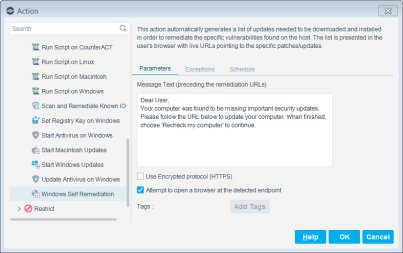
It is recommended to select Use Encrypted protocol (HTTPS) to send the redirected page via HTTPS. To send it via the non-encrypted HTTP protocol, clear the Use Encrypted protocol (HTTPS) checkbox. See Transmitting Actions via HTTPS for details.
You can define the action to automatically open a browser at the endpoint instead of waiting for the user to browse. This ensures that the message gets to the user faster. Select Attempt to open a browser at the detected endpoint. (This option is unavailable for Windows 2000 and Windows 2003 server machines, and for unmanaged machines.) eyeSight eyeControl uses a script when this option is selected and the endpoint is managed via domain credentials. Refer to About the HPS Inspection Engine in the HPS Inspection Engine Configuration Guide for details about scripts.
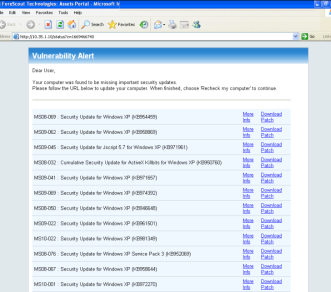
Network users can select the More Info link to review details about the vulnerability detected.
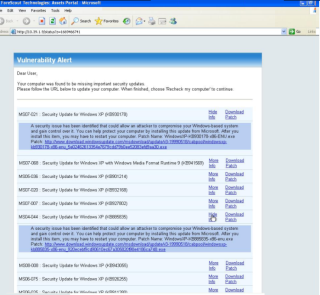
Network users can select the Recheck my Computer link to immediately recheck the status of their computer. If the required files are not downloaded and rechecked, redirection continues.
: fstool
convert_patch_path replace http://server1/patches
 minute read