Upload License Requests and Download License Files
License activities in the Console are performed offline if you have not completed the Customer Verification process during Console login OR if your Enterprise Manager is not connected to the internet when you perform the activity. See Activate a Forescout License, Update an Existing License File in the Forescout Console and Deactivate or Revoke a Forescout License for more information.
To activate, update or deactivate a license, upload the license request file created in the Console to the Forescout Customer Support Portal.
When activating or updating a license file, or when switching to Flexx Licensing, if the upload is successful, the new license file becomes available for download. To complete the activity, upload the license file in the Console.
For more information about performing these activities in the Console, see Manage Forescout Licenses.
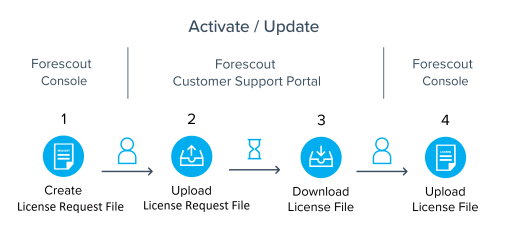
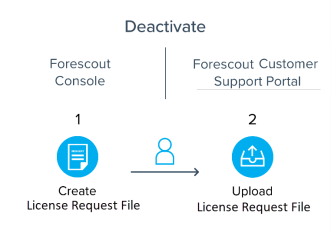
To upload requests and download license files:
- Navigate to the Forescout Customer Support Portal and select Licenses.
- Select License Management.
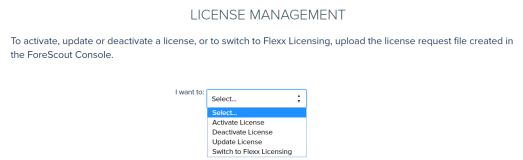
- Select the activity you want to perform and follow the on-screen instructions.
If you are activating or updating the license, or switching to Flexx licensing, and the upload succeeded, the download file will be available. After you successfully upload the request file, the latest license file will be available for future use next to the relevant deployment entry.
Note: For license activation: After you upload the license request file in the Customer Support Portal, the generated license file will be locked to the machine you downloaded the request from. If you try to activate a license on another machine using an already locked Deployment ID, activation will fail. You must first Deactivate the License File.
To access the license file in a deployment where files cannot be taken out of the internal network:
- Open the license request file and copy its contents to an email.
- Send the license request content to your Forescout representative who will generate and send back a license file using the request you sent.
 minute read